Creating a Homepage with Ethos Demo

I’ve installed the Ethos demo but want to create a different homepage. Can I create a page & then set it as my homepage? How would I do this?

I also have Jetpack installed which has a list of Related Posts at the bottom of every page. How can I remove Related Posts from the page that I want to set as my homepage?
Hi there,

The question is more of a WordPress related one than our theme. You can simply add a new page and use the Cornerstone builder to create your page. Then you can go to Settings > Reading menu and add that page name as your website homepage.

Jetpack is a 3rd party plugin and we can not give support for that. You need to contact the support of the developer of that plugin for the last question.

Thank you.

Thanks. How can I create a Homepage then with Ethos 1 demo rather than just having my latest posts show up? Or do I need to delete the demo and start again?

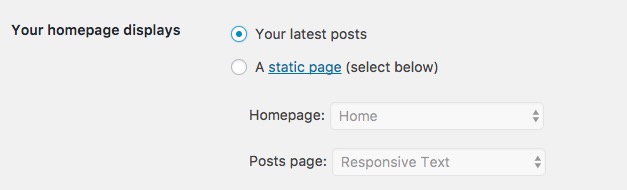
Hi there, No you need to go to Settings > Reading and change the o[tion below:

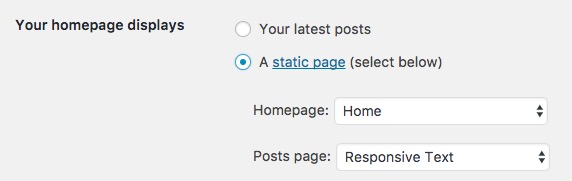
To this:

The homepage will be the page that you will create. and the posts page will be a page that you can simply create the name of the blog and set it here.

First one will be the homepage and the second one will be the listing of the blog posts, the one that currently is on the ehomepage.

This is a WordPress related setting. I suggest that you check this link for more information.

Thank you.

This topic was automatically closed 10 days after the last reply. New replies are no longer allowed.