Hello Steve,
Thanks for writing in! Please be advised that the shopping basket icon is part of menu navigation for the default header. This is exclusive for the default header only.
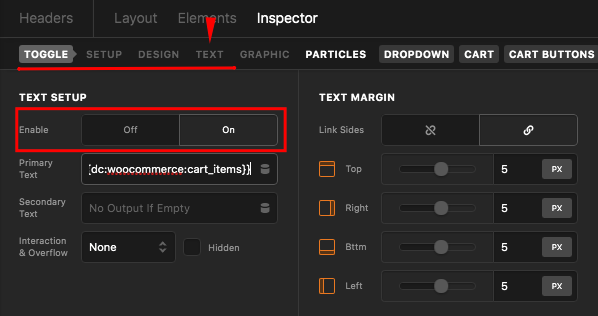
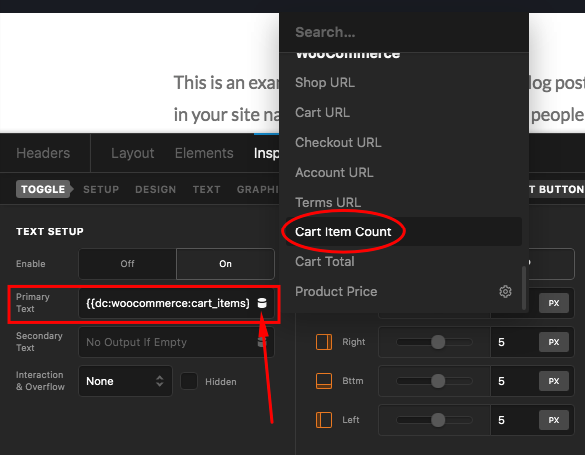
For the custom header builder, you have a different element which is an independent cart modal, cart dropdown and cart off canvas elements. You can display the number of cart items in these elements by enabling the text setup and use the dynamic content to load up the number of cart items.
Enabling the text setup in the cart modal, cart dropdown and cart off canvas elements:
Using the dynamic content to load the cart item count:
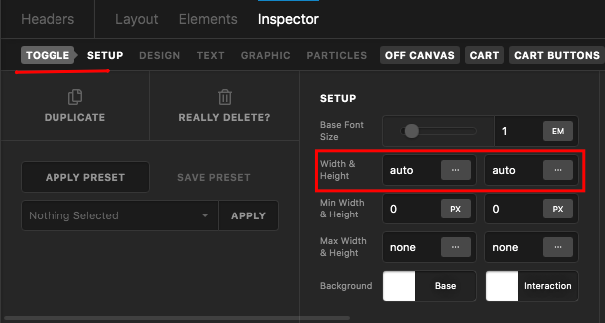
Of course, you will have to style the Toggle button as well. By default, the toggle button is circular. You can make it rectangular by setting the width and heights to auto. And then set the border-radius to 0, add some borders and shadows in needed to.
To learn more about these elements, please check out these documentation links:
And to learn more about the Dynamic Content, you can check this:
We would love to know this works well for you.


