Counter - Countdown To Date

Hi,

I am trying to use the counter feature to count down to a specific day. I saw a similar article on Help using the counter, however, the individual was using a third party plugin. In this case, I am trying to keep the third party plugins to a minimum and use the X theme.

The theme style is Integrity 1. What I tried doing was counting the number of days to August 28, 2018 which was 115 at the time. Then I set the countdown to 86400 seconds or one day. What I realized though was that the number of days did not change, it stayed at 114. So what I think is happening is that the counter is based on each visitor’s session, therefore it resets on visitor refresh.

Counter:
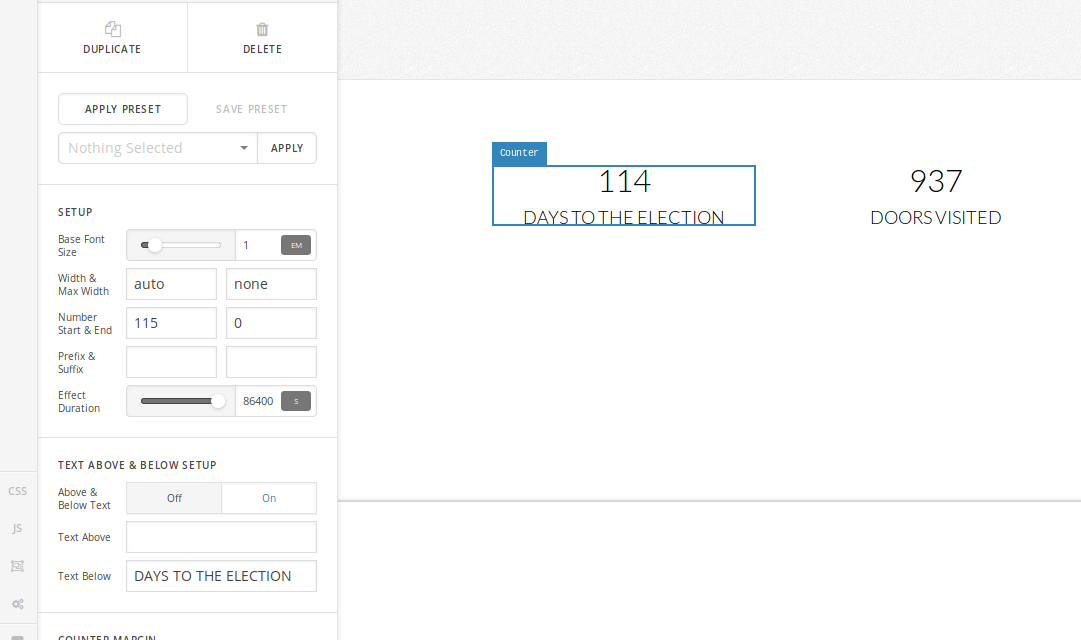
Any suggestions?

TIA,
Ducks

Hi Ducks,

I am not sure if I understood you correctly, do you mean if you do the changes in cornerstone the counter does not change in the preview?

You need to click outside the settings for the counter to update.

See video- https://www.screencast.com/t/mXVuhwWbZ

Thanks

No what I mean is that the counter does not cycle through the number of days remaining.
I set it for 115 days with 1 day (in seconds) with cornerstone. It went down to 114 and has stayed there for 3 days.

Hi,

Thank you for clarification.

Please note that the counter is not in anyway related to date. It’s just start to finish.

Thanks

Ok, so this confirms the session portion that I mentioned earlier. What would be the proper way to submit a feature request for this?

Hi,

I’ll submit this as a feature request.

Thanks.

This topic was automatically closed 10 days after the last reply. New replies are no longer allowed.