Could not render region top into x_masthead

Issue With Header Builder

_Could not render region top into x_masthead_

URL: http://184.175.102.239/~turnkeypro
Product: Pro v2.0.4 ( with child theme )
Issue: I have a clean install of WordPress (4.9.5) with no plugins activated. When I go into Pro > Header > Edit the Pro logo spins, and then I can edit elements in the bottom bar, however the header does not show up. I also receive this console log.


Hi turnkeydigital,

Could you please do the following and let me know how it goes?

  1. If you’re using a CDN, please clear the CDN’s cache and disable optimization services.
  2. Remove custom CSS and Javascript from the options or Child Theme and test the case.

If none of these helped, then please send us your WordPress Dashboard login details in a “Secure Note” so we can investigate this issue.

Thanks.

@Alaa I am developing on a single server, no cache installed and no custom CSS, JS.

Before I submitted the request I saw This Post and followed those steps.

Before your reply I deleted the account, created it again and reinstalled WordPress and X-Pro. Now when I try to load any pro feature I get

Login is on this note

Hi there,

Would you mind double checking if you have enough PHP memory limit as there are instances that the Pro builder would not load because there is not enough PHP memory limit set for Pro to load.

You may contact your host to increase your allocated memory or do it yourself by adding this code in your wp-config.php

define( 'WP_MEMORY_LIMIT', '256M' );
define( 'WP_MAX_MEMORY_LIMIT', '512M' );

Please let us know how it goes.

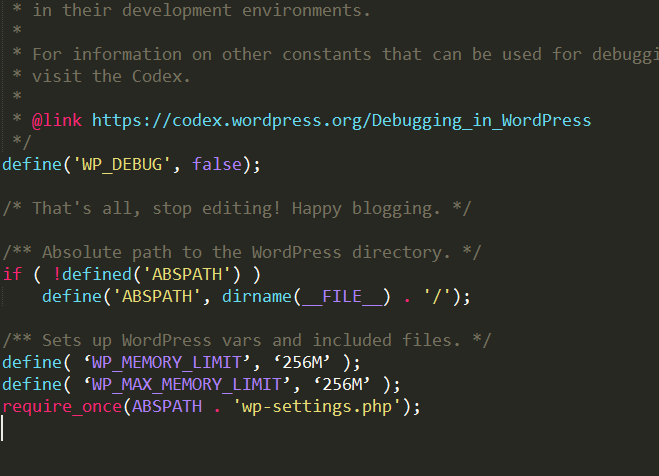
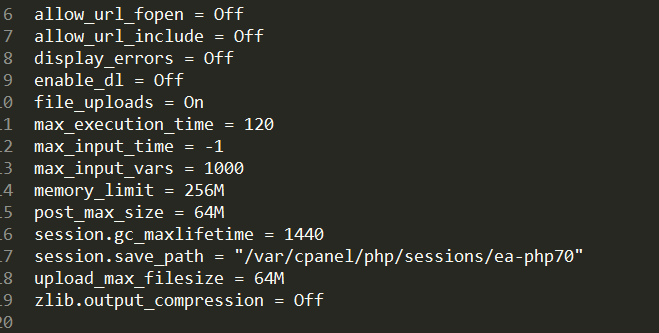
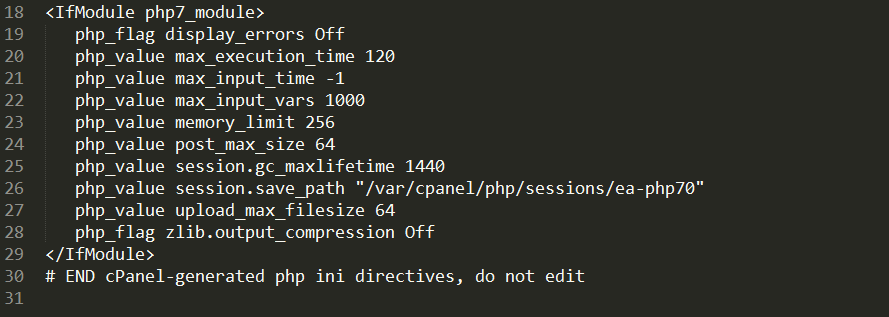
@Jade Thanks for the idea! I tried that before contacting support. Below is a screen shot of the PHP ini, and .htaccess

Hello There,

By default, WordPress will attempt to increase memory allocated to PHP to 40MB (code is at the beginning of /wp-includes/default-constants.php) for single site and 64MB for multisite, so the setting in wp-config.php should reflect something higher than 40MB or 64MB depending on your setup.

So even if you have 256MB being set up in your server, Wordpress will still allocate only up to 40MB. This is why we always recommend that you edit the wp-config.php file. In relation to that, you code did not work because you inserted incorrect single quotes.

The correct code and placement in the code is this:

Hope this helps.

That did the trick! :smiley: Thank you everyone!

You’re most welcome.

This topic was automatically closed 10 days after the last reply. New replies are no longer allowed.