I have a cornerstone form on my homepage, when I hit submit it will show source JSON of the page instead of the page.
Hello Bart,
Thanks for writing in! I have logged in, and I am seeing this.
- See the secure note below.
Please double-check.
Best Regards.
try again, fixed your issue
Hello Bart,
I have created a demo and even downloaded your homepage into my local testing server. The CS Form works on my end when there are a few Sections only.

I have compared my server settings your server settings. The only difference is that I am using PHP 8.1 along with these values:
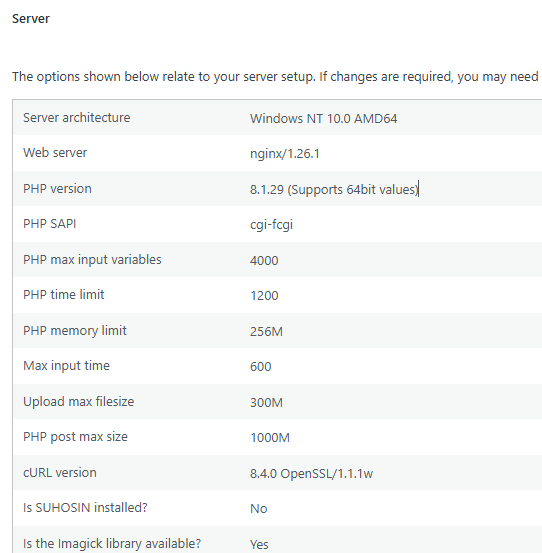
You can check this in Tools > Site Health > Info > Server. You may need to increase to PHP post max size.
Kindly let us know how it goes.
I see that the small page you created works.
I’ve updated my PHP settings to reflect yours, but that doesn’t work.
PHP 8.1 is EOL, so I’m not moving there; it seems like a bug somewhere then?
If I disable the blog section on the homepage, it works, so there appears to be some issue?
Hey Bart,
The issue is tricky to investigate in the live site. Would you mind copying your site to a staging server so we can test without breaking anything? If not, please duplicate your form and blog section and add the copy to a test page and we’ll test from there. Please then give us the URL of the test page.
Thanks.
Hi,
I did the testing here:
If you need a staging site anyway let me know, then I’ll create a copy.
Hey Bart,
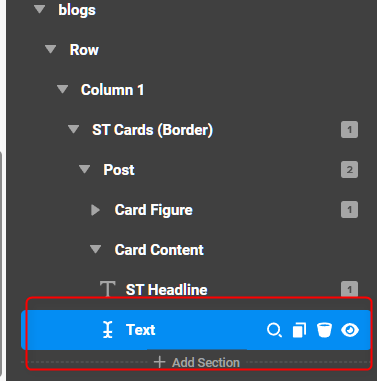
The cause of the issue is the excerpt in your blog posts. We’re currently finding out why this happens. For now, try using manual excerpts. Or, avoid using excerpts.

1 Like
In which post does this problem occur?
With manual excerpts, you mean the 2nd picture in your post right?
Hey Bart,
We can’t test it because it’s a live site so you need to check your posts. Temporarily delete posts until the issue is gone. The last post you delete that causes the issue is where the conflict is.
Yes.
I need to try on a sandbox site then, what is the easiest way to export the the template to a new website, of can I just copy the database and all pro settings are transfered as well?
Hello Bart,
You can clone the complete website, including the files and database. If you want to export a template and import it into another website, you can use the Template Manager. Please refer to this documentation to learn more about how to export and import templates.
Hope it helps
Thanks
I’ve copied the site ( see secure note)
I’ve put all the posts in concept mode, the problem still persists when no post is shown in the block
As Christian said the excerpt Dynamic content is affecting the forms processing. This is something I’ll update on our end, but in the mean time you’ll need to hide or remove that piece of text. Thanks for sending our way and have a great day.
Will I be notified once you’ve fixed it?
Hey Bart,
Please watch out for our changelog here:
Cheers.
This topic was automatically closed 10 days after the last reply. New replies are no longer allowed.