Cornerstone UI messed up when logged in as an Editor

Hi there,

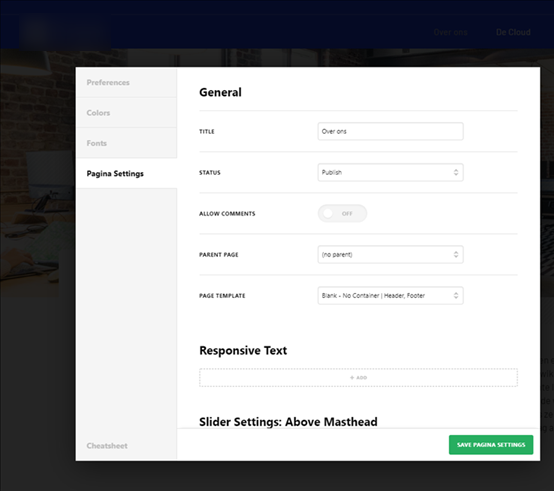
I have a problem when I’m logged in as an Editor. Cornerstone is showing a black and white UI with transparant menu’s. When I login in as an Administrator everything works and looks fine.

Schermafbeelding 2020-06-02 om 14.40.47|690x424

What is happening?

Hey @Marco,

I opened Cornerstone using an Editor account in my site and I didn’t experience the issue you showed.

This means that there’s something different in your site that’s causing the issue. Let’s ensure first to the issue is not caused by common factors so if you have not done so yet, please do the rest of the troubleshooting procedures mentioned in our Common Issues article here: https://theme.co/docs/common-issues. You already have done updating Pro so you can skip it.

Only if none of the common solutions work, give us the following info in a secure note.

  • WordPress Login URL
  • Editor level username and password
  • FTP access might also be needed

Thanks.

Hi Christian, Thx for your response.

I disabled all the plugins, cleared cache, no CDN active, Deleted custom css, no extra javascript, no caching active. Tried all the sugested steps but still the same problem.

And I noticed that it is not possible to change the UI theme to dark or light. See screen.

I hope you guys can help me fix this :slight_smile:

Hey @Marco,

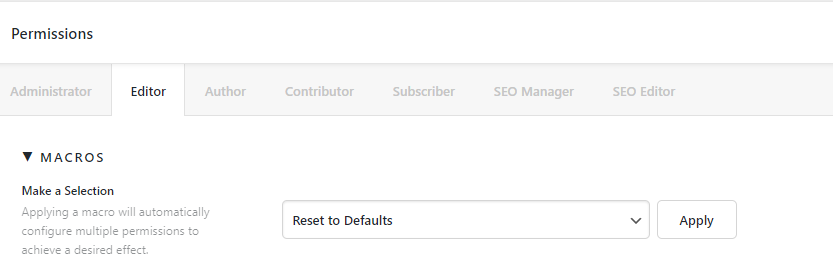
Resetting the Editor Permissions in X/Pro > Settings fixed the issue. There might have been just a glitch during saving the Permissions when you enabled some settings. Just let us know if you can replicate the issue clearly next time.

image

Hope that helps.

Hi,

I had to change UI theme to dark. It was set to ‘True’ and not light or dark…?

Strange, anyway it works now. Thx!

Hello Marco,

We are just glad that you have figured it out a way to correct the said issue.
Thanks for letting us know!

Best Regards.

This topic was automatically closed 10 days after the last reply. New replies are no longer allowed.