When I try to open cornerstone settings I get the below error

Please advise.
I updated the password in the secure note.
When I try to open cornerstone settings I get the below error
Please advise.
I updated the password in the secure note.
Hey @mhannor,
The login credentials are incorrect (see screenshot in the secure note). We also need to check if you’ve done the basic troubleshooting below. If not, please test them out.
Thanks.
Most of these dont apply its a brand new install. i just used your slider to do what i needed to do. i did increase the php memory but that didn’t solve it.
Hello Marshae,
I was able to log in and open Cornerstone Builder. I can even load the homepage.
What I noticed, though, is this:
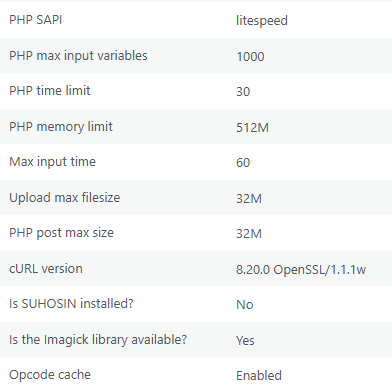
You can check this in Tools > Site Health > Info > Server. Increase the PHP values to the following:
You may need to ask for further assistance from your hosting provider to increase these values.
Thanks.
I made the changes and it still does not work, the error only happens when i go to conerstone and settings, everything else in cornerstone works fine. This is a brand new site, no extra plugins, i need to go to the settings to use rev slider
Hello Marshae,
This issue could be caused by an invalid htaccess. Log in to your FTP and check your htaccess. There might be rules that is blocking the access to the Cornerstone settings.
Check out this documentation for more details:
Thanks.
This topic was automatically closed 10 days after the last reply. New replies are no longer allowed.
