Cornerstone preview of custom element

I have the same issue mentioned in these two posts:

My custom element includes an angular component, which behaves correctly when rendered on the “normal” page, but not in the cornerstone designer.

The angular app is setup using wp_register_script & wp_enqueue_script. I read the solution in that first article, which looks promising, but am a bit confused by it - I couldn’t see any evidence of xData.api.map in the pro codebase.

Happy to share a login if it helps.
Hi There,

xData.api.map is deprecated. Use window.cs.global.everinit instead like this:

window.csGlobal.everinit( '.any-css-selector', function(el){
    /* Initialize your element here */
})

Hope this helps.

Thanks! Any ideas what might go inside “/* Initialize your element here */” in the context of angular 4? You can see the page here https://wp-demo.tigerbay.cloud/

Has an element “app-landing-form”

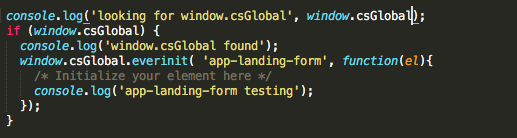
Attempting to use this code

I get

bootstrap-cms.js is registered via wp_enqueue_script in the wp_enqueue_scripts action

Hi There,

Unfortunately, this is already outside the scope of our support. We are trying to help as possible, regretfully, this particular customization request is outside the scope of our support as this is not related to an issue with the theme and instead has to do with your customization of it. As such, you will need to investigate this particular issue on your own or seek help from a developer should you not feel comfortable making these changes yourself. We do have an in-house custom development team that offer paid services, who may be able to assist. They can be contacted at [email protected] if this is of interest to you. If you have any further questions about the theme, we are more than happy to provide you with assistance on these inquiries.

Thank you for your understanding.

This topic was automatically closed 10 days after the last reply. New replies are no longer allowed.