Cornerstone preview not working for pages with specific text in url

I’ve confirmed through testing/debugging that any page with the string “get-involved” in the url does not show preview in Cornerstone. It’s the strangest issue. I’ve created several pages excluding that phrase in the url and they all show preview in Cornerstone.

For example, I can do:

eversightvision.org…/gett-involved/

But I can’t do:

eversightvision.org…/get-involvedd/

Any page that has the uninterrupted phrase “get-involved” in it won’t show preview in Cornerstone. All child pages of the parent page with the phrase in url are effected too.

Any ideas?
Hi there,

Thanks for writing in.

I see the similar issue but different wording and they could be due to internal caching, as moving it to stage fixes the issue. Some caches are based on URL since it’s unique per page, I recommend cloning it to staging and test it there.

Thanks!

Thanks Rad! Would you happen to know how I would “clear” internal cache? I’m using WPEngine hosting.

Hi,

Please see Clear Cache on WPEngine Section on the link below

Hope that helps.

Thanks Paul. For some reason it’s still not working. It’s only those pages with “get-involved” in the URL. Any other ideas?

Hey There,

You might need to actually login to the WP Engine and purge the site cache. You’ll need to clear the site cache in WPEngine right after saving every changes you made in Cornerstone.

How to purge the site cache
You can use this interactive tutorial, “What should I do if I make changes and they don’t take effect?“, in the User Portal, or you can follow the instructions below.
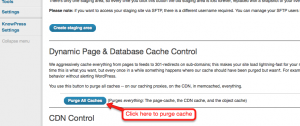
Purging your site cache is very easy. You just need to know where the button is located:

  • Long into /wp-admin/
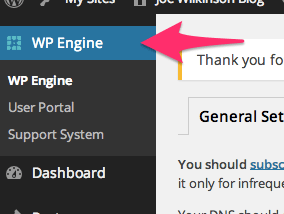
  • Click on WP Engine button located at the left top side.

  • Click “Purge all caches.”

Finally, clear your browser cache and refresh your page. Once you refresh the page you should notice that the content has updated. If it is still not updating, you may want to consider contacting support by creating a support ticket.

To know more about WPEngine caching system, please check it out here: https://wpengine.com/support/cache/

Hope this helps.

This topic was automatically closed 10 days after the last reply. New replies are no longer allowed.

Hey There,

We are just glad that you have figured it out a way to correct the said issue.
Thanks for letting us know!

Best Regards.