Cornerstone is not working after updates - I just get a spinning circle and nothing happens.
It was fine before updating - can I roll back to previous version?
Thanks
Cornerstone is not working after updates - I just get a spinning circle and nothing happens.
It was fine before updating - can I roll back to previous version?
Thanks
Hello @pollenbird,
Thanks for asking. 
Yes, you can rollback to earlier version. To do so, from members area please download the Stability Release package and install the same on your website.
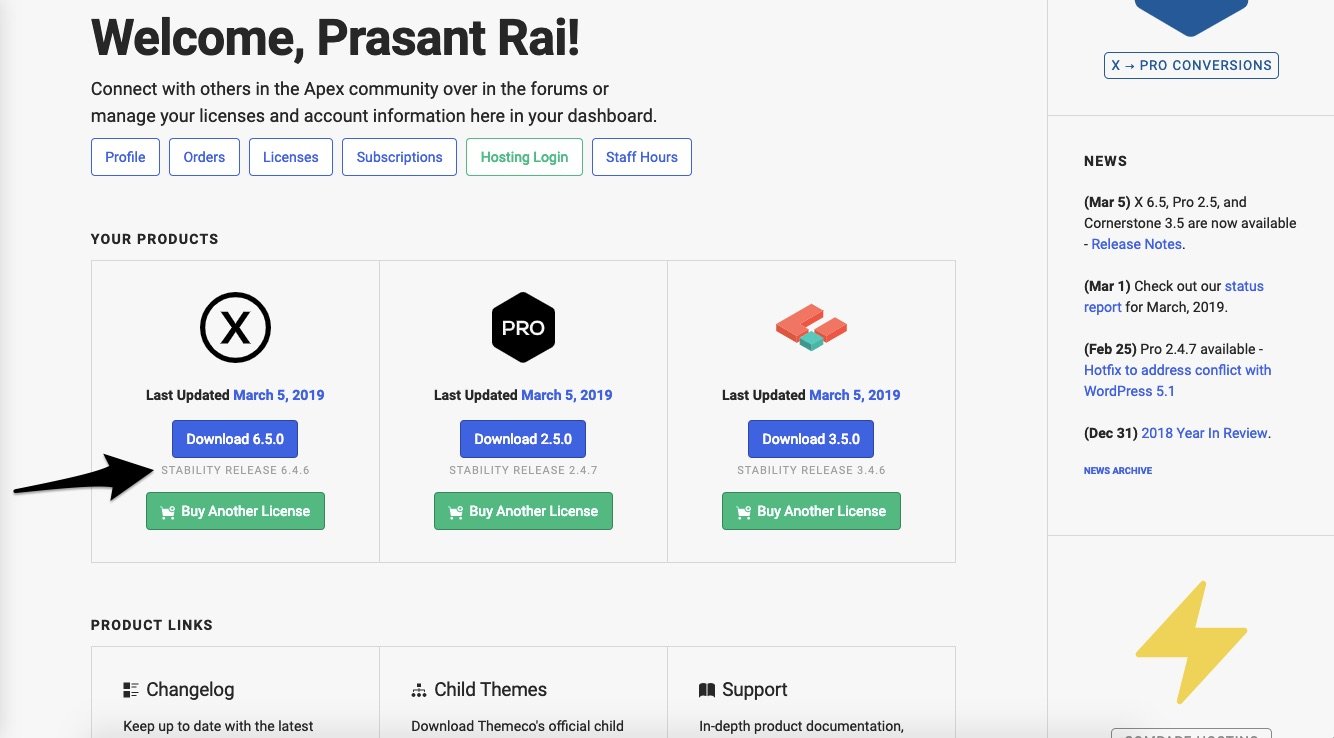
Thanks.
I’m having the same issue. Site content is viewable on frontend but I just get the spinning circle on Cornerstone edit/admin pages. Is this a widespread issue? I would prefer to not roll back but if there is no immediate fix I guess I will.
I can confirm, cornerstone completely broken on the release, just spins. Would prefer to not revert, will a patch be out soon?
Glad it’s not just me…
Thank you - do I just upload it as a plugin? I’ve not done this before!
Also, will there be a patch out soon?
Thanks for your help
Hi guys,
Yes, you’ll have deactivate the existing one first, then delete it. Then install it as normal plugin by uploading it in Admin > Plugins > Add new > Upload Plugin.
But I don’t see any spinning issue on my cornerstone, I recommend disabling any cache plugin or feature then test it again.
Thanks!
Hi there,
The 3.5.2 update released yesterday should take care of the issue you’re seeing. Let us know if that works for you.
This topic was automatically closed 10 days after the last reply. New replies are no longer allowed.