I can change element content in Cornerstone, but updates to page-specific CSS and JS don’t save in Cornerstone. Never had this issue until I updated Cornerstone plugin and X Theme to latest versions. No errors are thrown, and I spent an hour with WPEngine support exploring whether it was a hosting side problem – it wasn’t. I have this problem both in production after clearing cache, and in staging (where there is no cache or CDN).
Hi There,
Could you please try adding the following code into your wp-config.php file in the root of your WordPress installation.
define( 'WP_MEMORY_LIMIT', '256M' ); define( 'WP_MAX_MEMORY_LIMIT', '256M' );
If that doesn’t help, would you mind providing us with login credentials(by clicking on the Secure Note button at the bottom) so we can take a closer look? To do this, you can make a post with the following info:
- Link to your site
- WordPress Admin username / password
- FTP credentials
Thanks.
That did not work. Posting a secure note with creds now. (BTW never got an email notification that there was an update to this support ticket. Only found it by logging back in to check.)
Hello There,
The email notifications were disabled by default and on purpose.
I have logged in and I can confirm that it is not saving any of my changes. It be because of caching issue. Could you please update X and Cornerstone to the latest versions?
X 5.2.4 and Cornerstone 2.1.6 are now available in automatic updates! This release contains fixes for several issues so be sure to check out the changelog (http://theme.co/changelog/). Please do update to the latest version. After doing the updates, always remember to clear all caches (if you are using WP Rocket, WP SuperCache or W3 Total Cache) when updating so that the code from the latest release is always in use. This will help you to avoid any potential errors.
Please let us know how it goes.
Thanks for the suggestion. I updated X and Cornerstone to these new versions, purged the cache, and unfortunately am still experiencing the issue. What’s my next step?
Hi there,
Is this issue only happening to a specific page? I have tried creating a draft page here and I applied a class to the element and the custom CSS added seems to work fine.
Are you trying to add a custom CSS to a V2 element? Because most likely, the custom CSS you have added gets overridden by the element’s setting but it also depends on the level of the specificity of the selector you have added to the CSS.
Kindly let us know which page you are working on where the custom CSS you have added doesn’t work so that we could double check it.
Thank you.
As stated in my original post, the issue is on the front page of the site, both for page-specific CSS and page-specific JS. I’m not sure what “V2 element” means, but the issue is not CSS selector specificity. It is that my changes to the page CSS and JS are not being saved at all.
Hi @aprilnm,
I was able to save something on your CSS.
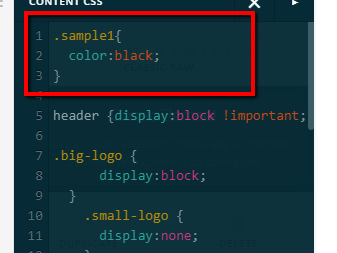
In order for me to save on your setup,I remove the JS script in your classic raw element. It is causing conflict with the JS and CSS. It could not be saved properly when you add JS in your raw html element.
Please be advice also that it would be best that you will add all script in your Custom JS.
Hope it helps.
Thanks.
I’m not seeing that item saved in the custom CSS of my setup. What page is that on? I don’t think the raw JS in the content element was the problem, because I only just added that about an hour ago as I need to meet a deadline and that is the only thing that works at the moment.
Hi There,
I did investigate the issue and it’s really hard when the site is not giving any clue (error). What I am certain though is I was able to save the JS if I remove the content on that first RAW content element (I was able to moved the script on the JS box). But it is inconsistent sometimes it saves sometimes not, I feel that a caching is involved on this or this mixed content resources, would you mind to confirm that the site is not under an internal caching feature? And please resolve all of those mixed content error by re-adding those images.
Thanks,
Unfortunately I have the same issue with one of my pages. Neither CSS nor JS changes are saved in cornerstone editor. Only my index page is affected, on another created ‘test’ page, CSS/JS changes are saved.
OK I found the problem:
After disabling this plugin saving my custom css/js code on the specific page works again as expected.
Glad to hear you got it sorted.
Cheers!
How do I go about getting a refund for my license on this?
@aprilnm, You may need to contact Themeforest as they the one that handles the refund. Thanks!
Buf if you wish us to continue checking your site, please provide a video recording of all the issues you’re getting in.
This topic was automatically closed 10 days after the last reply. New replies are no longer allowed.