Cornerstone Navigation Modal Word Spacing

Hi,
I’m using cornerstone navigation inline element and I can’t figure out how to remove the extra spacing between the menu links. Is there a setting I’m over looking? I removed all the padding but my links are still spaced too far apart. Please advise.

Thank you!
Hello @quituck,

Thanks for writing in!

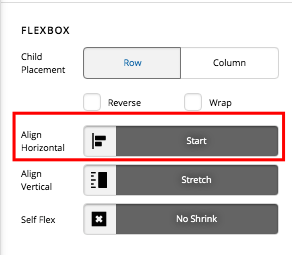
To get your issue resolved, please click the navigation inline element and in the element settings, find the Flexbox option. The “Horizontal Alignment” should be set to start.

Please let us know if this works out for you.

That worked perfectly.

Thank you!

We are delighted to assist you with this.

Cheers!

This topic was automatically closed 10 days after the last reply. New replies are no longer allowed.