Hi.
My page at
https://besttravelgoods.com/blog-categories/ is center instead of being right under the “Blog Categories”.
I want the page to be aligned like
Any ideas as to how I can do this in cornerstone?
Hi.
My page at
https://besttravelgoods.com/blog-categories/ is center instead of being right under the “Blog Categories”.
I want the page to be aligned like
Any ideas as to how I can do this in cornerstone?
Hi @andyvnguyen97,
Thanks for writing in.
And yes, it’s possible. Please inspect each rows of your section and turn off the inner container.
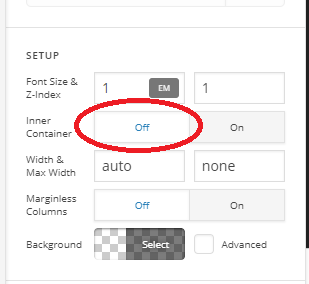
Thanks!
Hi, thanks for the reply.
After checking it off, it is too wide now and not inline with the “Blog Categories” title.
Hello There,
It is too wide when you disabled the inner container because you also have added a -2.5em margin to your section. Please remove the margin or set the margin of your section to 0 and you will have this layout:

Please let us know how it goes.
hi @RueNel
It worked, but now it’s too far down. I tried creating a new section and it appears this is the default.
** EDIT **
I added these codes in the section’s custom CSS
.e1521-1.x-section {
padding: 0px 0px 0px 0px;
}
.x-section {
padding: 0px 0px;
}
And it made it higher up. Hopefully it doesn’t touch anything else.
Hello There,
If you want to move up the section, only set the negative margin to the top margin by utilizing the individual margin settings.

And yes, setting the top padding to zero will resolve the issue as well since by default, a section has a padding of 45 pixels.
Best Regards.
This topic was automatically closed 10 days after the last reply. New replies are no longer allowed.