Dear friends,
I have been using your fantastic CORNERSTONE with satisfaction for many years now.
But now, after the last update, I find myself having a lot of difficulty using it.
I know it will only take time to get used to it, however the description of the various options with that gray on a black background is tiring for the eyes (and I use a high-end monitor).
Please let me know if there is any unknown setting to improve the situation.
Thanks and keep it up!
Massimo
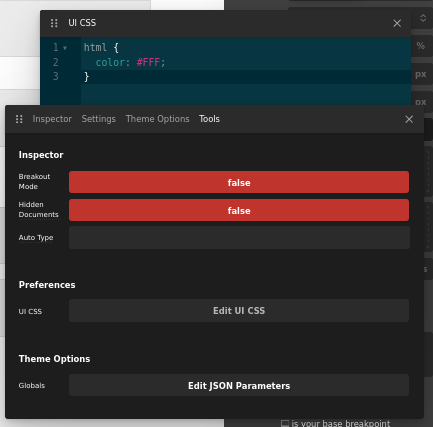
In the dev toolkit under the tools we have a way to edit the editor CSS. See “Edit UI CSS”. I agree it could be more legible and have more contrasted text in certain areas. The current CSS I have in the screenshot should get you your desired effect in the theme options area. Thanks for the kind words have a great day!
Forgive me… but where is the dev toolkit?
Hello @ferlo61,
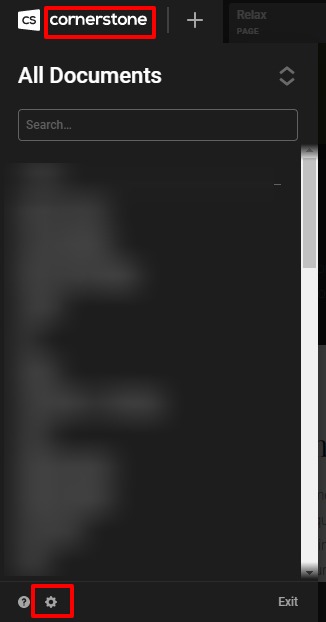
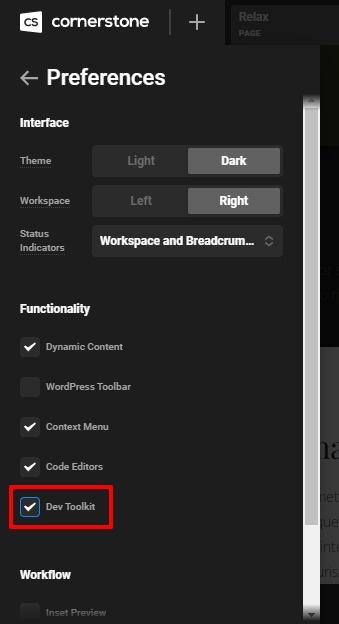
To enable the Dev Toolkit you need to click on the Cornerstone—> click on the Settings Icon—>Enable the Dev Toolkit.
Hope it helps
Thanks
This topic was automatically closed 10 days after the last reply. New replies are no longer allowed.