Cornerstone editor, editing overflowing elements truncated

When I want to edit a component in Cornerstone with an element that contains a dropdown, such as a mega menu dropdown, the content of the dropdown is not displayed because it is not one of the elements that affect the content height.

screenshot_ 2025-09-25 um 11.16.25

My manual fix for this is to allow overflow for the HTML element embedded in .tco-preview-iframe-container.

screenshot_ 2025-09-25 um 11.17.27

Could you perhaps make it possible in general that such elements are not cut off so that they can be edited visible?

1 Like

Hi @Regnalf,

Thanks for reaching out.
I have tried but have been unable to replicate the same in my local environment. Can you please provide login credentials for your site in a secure note to examine it further, including:

– WordPress Site URL & Login URL
– WordPress Admin username/password

  • Name the component and the page where it has already been used

To create a secure note, click the key icon underneath any of your posts.

Thanks

I have provided the access data for my test page because the original page is secured with an IP filter that I do not have access to, and it would take weeks before we have access to it. But the test page reproduces exactly the same problem. It’s a test environment, so feel free to play with.

I should also mention that this is only a problem when creating or editing the element in the Cornerstone Editor. It works on the page where the element is integrated because there is enough space underneath for the drop-down menu to function.

Hello @Regnalf,

This isn’t an issue. This happens because the Preview Builder has a limited preview pane height and is only based on the height of your element. When creating a Component element, we highly recommend that you include Section, Row, and Columns as the container of your element. Use the Component Export so that your element will be displayed in the Cornerstone prefab element library.

Please check out the #Scaffolding or #Atoms Component, where we have demonstrated the prefab components we have used for the Magnate demo site.

Hope this helps.

As I already wrote, the problem is that the HTML tag inside the iframe has overflow-x: hidden , which prevents dropdowns and floating elements from being displayed correctly.
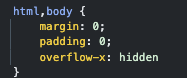
screenshot_ 2025-10-03 um 14.05.36

Because the preview is rendered via iframe + srcdoc , this CSS cannot be overridden externally. The only reliable fix must come from your side.

Please note: the iframe element itself already uses overflow: clip, which safely limits the content area. That makes the overflow-x: hidden on the inner HTML unnecessary and even harmful , because it breaks any component that needs to float outside the normal flow (dropdowns, tooltips, off-canvas menus).

Proposed fix for developers:

Simply allow the inner <html> element to use the default (overflow: visible). This way the content behaves correctly, and the iframe still ensures nothing leaks outside its boundaries.

The body overflow must keep the overflow-x: hidden setting.

For everyone needing a temporary solution, this JavaScript works as a workaround:

document.addEventListener("DOMContentLoaded", function () {
const observer = new MutationObserver(() => {
document.querySelectorAll('.tco-preview-iframe-container iframe').forEach(iframe => {
  iframe.addEventListener("load", () => {
    try {
      let doc = iframe.contentDocument || iframe.contentWindow.document;
      if (doc) {
        doc.documentElement.style.overflow = "visible";
      }
    } catch(e) {
      console.warn("No access to iframe:", e);
    }
  });
 });
});

observer.observe(document.body, { childList: true, subtree: true });
});

Hello @Regnalf,

We will forward your suggestions to our developers.

Thanks.

This topic was automatically closed 10 days after the last reply. New replies are no longer allowed.
