Cornerstone Custom Elements: Controls not showing

Hello friends,

I’m trying to build a custom element for Cornerstone. I have built more than enough for Cornerstone 2.x, but it is the first time I’m doing so for the current version. I’ve been referring to the Element API Primer and Element API Reference and most everything has gone well.

I’m running into a problem, though, when trying to include the ‘bg’ and/or ‘omega’ partials in my element. The other controls simply stop showing! I thought I must be misunderstanding something or doing it wrong, but then i downloaded and installed the sample element plugin provided by the guide, and it has the same problem: it’s supposed to show about five controls + the bg and omega partials, but the five controls are all missing.

Perhaps it is I who is missing something? Or is this a bug?

Thank you kindly,
vayu

Hi Vayu

I have checked the Sample Element plugin and it works as it is expected. It seems that you are trying to customize it, regretfully, supporting custom element is beyond the theme support, but I would like to suggest to you about our newly launched service called One where all types of customization requests are handled.

Thanks

Hello tristup,

I actually did not try to customize anything. I simply installed the sample element as it came. I see all of the “partial” fields (ID, class, etc.), but none of the other controls that are supposed to be there as per the example.

I have attached the screenshot of what I see (again, this is just as the element came; I didn’t customize a thing). Can you let me know if it’s the same thing you see? In the meantime I will check out One. Thank you!

kind regards,
vayu

Hello Vayu,

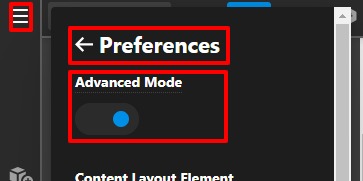
Please make sure you have set the “Advanced Mode” as “ON”. To set it you need to go to the page builder -->Click on the hamburger menu icon—>Preferences -->Advanced Mode.

Please have a look at the given screenshot below.
Front-Page-Content-Pro (1)

Hope it helps
Thanks

That solves the mystery. Thank you! :slight_smile:

Hi Vayu,

Glad that we are able to help you.

Thanks

This topic was automatically closed 10 days after the last reply. New replies are no longer allowed.