How do I get just one element from a Design Cloud site?
E.g, I want to replicate the picture/slider menu on top of the page in the Ethos Magazine site.
Can I either import that element one way or another. If not, can I find out how it was made. Not the details, but e.g. was it just with PRO or was a specific plugin used, such as a slider? Which one: Soliloquy, Slider Revolution?..
Thanks for any hint you can give me,
Patrick

Hello Patrick,
Thanks for writing to us.
In case if you want to import the design cloud element. You can only import Headers. Presets. Content. Footers, and Layouts. In case if you import the Sites from the design cloud it would override your settings.
For the demo that you have mentioned, you can set up the post slide like that and this option is only available on the Ethos Stack. Please note that if you set the Stack as Ethos it would change the layout of your site as well and the design of the site.
Please have a look at the given screenshot below to get a similar layout by using Ethos settings
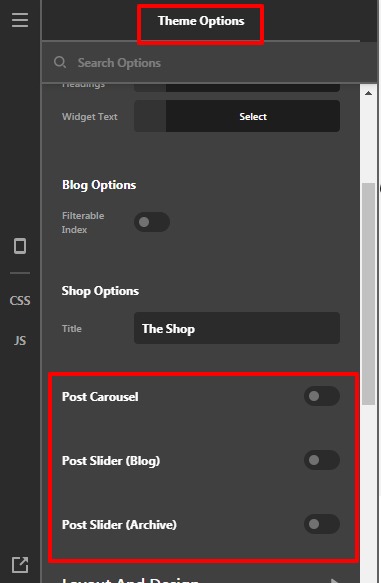
Both the slider is good and available in our bundled plugin. You can use it depeneding on your design and requirements. In case if you want a post slider you can use Slider Revolution.
Thanks
This topic was automatically closed 10 days after the last reply. New replies are no longer allowed.