Copy v2 elements html for off canvas content

Hi
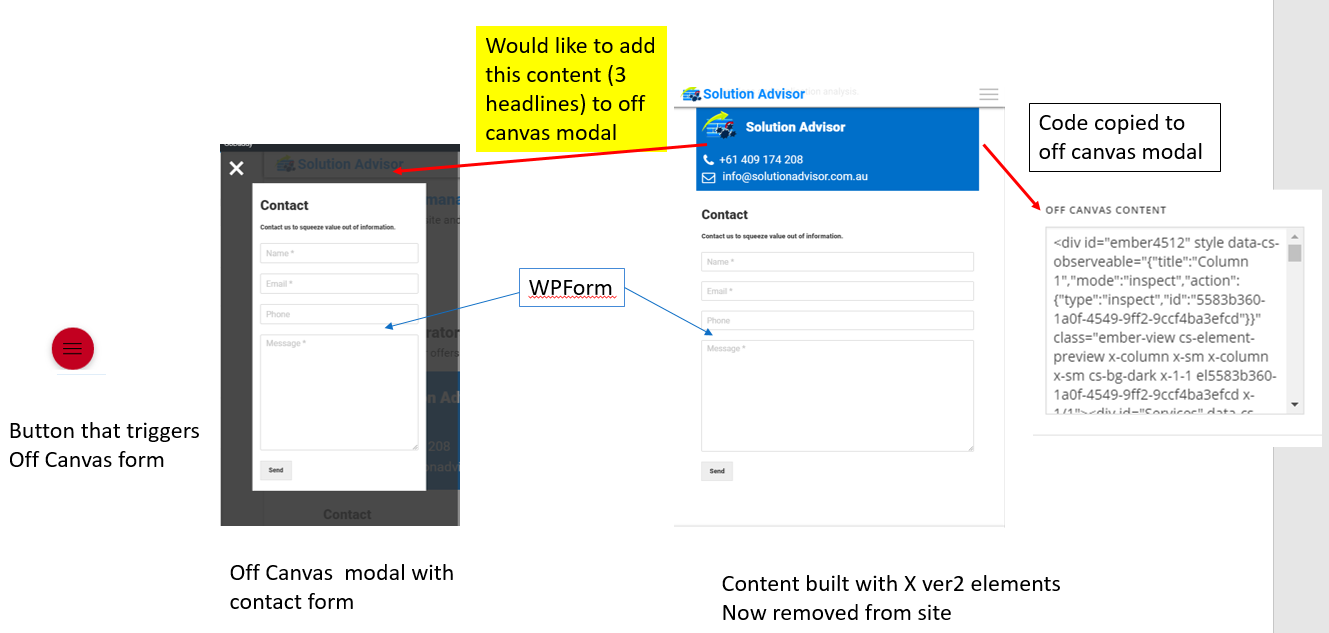
Happy New Year! - I have a question about off canvas content.

In the off canvas content I was able to add a form. What I wanted to do was add 3 responsive headline elements above the form with a different background color and border. - I’ve tried CSS and HTML however spent too much time (days) with out results.

I then used X to create the headline element in the PRO content builder (in minutes) then copied all the code into the off canvas content. It actually worked well, until I deleted the rows in my page.

My question is can I use the content builder in PRO to create the html for off canvas content? or is there a better way to place a responsive headline element in the off canvas?
Regards
Jeff

Hi there,

Thanks for writing in.

You should use classic elements instead of v2 elements. V2 elements are only available to the page where it’s created (referenced by ID). Hence, copying it on a different page or deleting it from the same page will also make it non-functional to wherever you copied it. Please try the classic elements.

Thanks!

Hi Rad

Thanks for the quick feedback. I tried classic elements - no luck, as the icon, text and image elements aren’t styled and layed out as easily.

Its a shame as I can achieve the solution within a PRO page however its not as easy on the modal elements such as off canvas.

I appreciate how far the PRO product has come in the last 12 months and there will be many requirements for your team to prioritise and develop. I think if you keep with the principle of “No need to know how to code” the modals such as off canvas may be able to use the PRO V2 elements in the future.

Keep up the good work.
Regards
Jeff

Hi there,

Actually, it is a valid point. As my colleague mentioned you will not be able to use the Pro built stuff in the Off Canvas, as they are referenced by ID and as soon as you delete the original source created, the version of the Off-Canvas will not work.

Unless you keep the original source and hide it for all screen sizes using the Hide During the Breakpoint option.

But it will make your builder crowded with stuff that you do not use and have it there only to work in off-canvas.

We will add your request as a feature request to find a way to be able to avoid coding inside the Off Canvas. Meanwhile, if you come up with a good UI solution share it with us.

Thank you.

Hi Christopher

Thank you for your reply.

I did try to create a private page then copied the source to the off canvas however this didn’t work - there is obviously a lot that goes on behind the V2 element GUI.

My solution for now is not to use the off canvas modal as I’m trying to minimize customisation and work arounds. PRO is definitely making life easy - looking forward to continuing the journey this year…
Regards
Jeff

Hi Jeff,

Yes, classic element and version 2 elements works differently. We provide those detailed options for v2 to minimize customization. Each of those detailed settings will be saved on the database based on unique ID of the element. Unlike classic element that everything is rendered on the frontend.

Let us know how this goes for you.

This topic was automatically closed 10 days after the last reply. New replies are no longer allowed.