Convert Plus plugin support

Hello,

A little less than a month ago, you helped me diagnose a problem I was having with Convert Plus:

Convert Plus > Modal works but nothing else

I eventually found the root of my problem and was able to fix it by editing some custom code the previous developer put on the site.

However, that is just a bandaid, and having this custom code on the site should not be implemented long term. But in order to get rid of it, I need plugin support directly from Convert Plus to see why Tags and Categories from custom post types are not functioning correctly on the “Page Targeting” options on the front end.

Since our license with them is included with our purchase and use of this theme (or at least that’s how I understand it), how can I contact them to get support without a purchase key?

Thank you
Hello Dominik,

Thanks for writing in! Regretfully there is no license code because the ConvertPlus is a bundled plugin. And without any key, you can’t submit any support ticket to them. The best way to personally communicate with their support is only to purchase a separate license of the plugin. The separate plugin license key should give you access to their support ticket.

Regards.

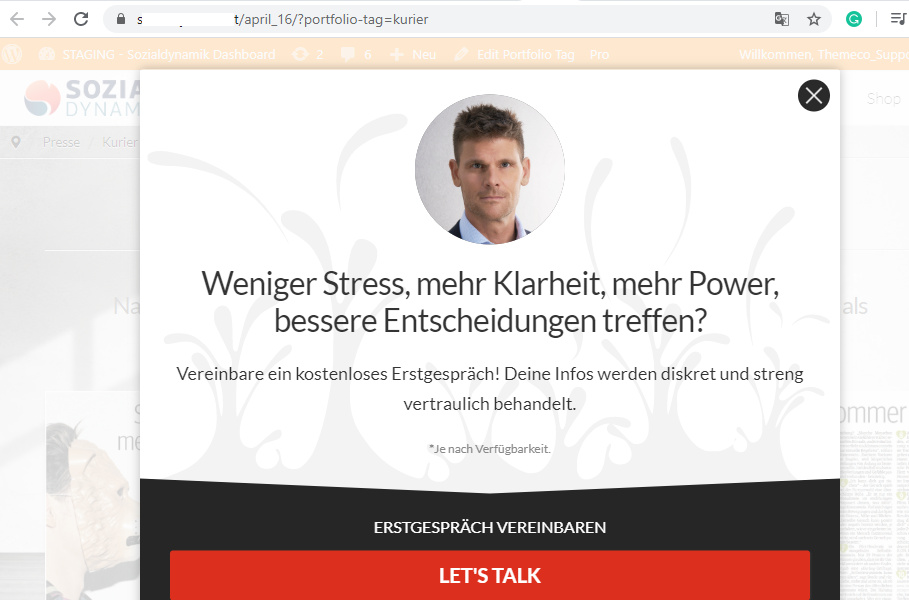
I believe there is a problem with the Convert Plus filter that does not allow me to target the Portfolio Tags that you include with the theme. I also believe that if we figure out why it doesn’t target the portfolio tags, it may also not target other custom post-type tags.

I AM able to target portfolio items individually by TITLE, but tags and categories do not work.

Since we have to keep it within the scope of your support, let’s just figure out why I can’t target Portfolio Tags & Categories in the Target Pages options of Convert Plus.

Thank you

Hi Dominik,

Thanks for the video.

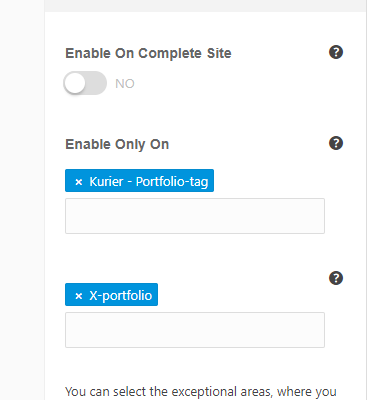
The portfolio tags are taxonomy, and it targets taxonomy pages and not the portfolio. Hence, the popup should work on your selected portfolio tags, example

image

And you’ll get this

If you’re targeting a portfolio page like in your video since you’re showing a sample Paarkommunikation – Sprichst du meine Sprache. Then what you need is post type and not the portfolio tags. Example,

image

I have tried it on your staging and it works, but I went ahead and remove X Portfolio again so you could try it.

Thanks!

Thank you for the explanation. That makes sense; however, it’s not the action or the targeting that I need.

Just like we’re able to target all blog posts containing a specific tag, I would hope it’s possible to target all portfolio items containing a specific tag.

Here’s another video to clarify further:

Hi Dominik,

Thanks for the video, still, what you assigned is a taxonomy. All archives like category, tags, portfolio tags, product categories, brands and similar are all taxonomies. Hence, changing it to post tags as shown in the video is the same as choosing portfolio tags. And by that, the modal will only appear to the taxonomy page of the selected post tag instead of the actual post.

I do understand what you’re trying to achieve, and it’s by displaying the modal to single post page that contains the specific tag, and which isn’t currently possible with existing settings, it’s a plugin limitation. Perhaps it’s doable with custom code that you have provided on your other thread. Its documentation is available here https://www.convertplug.com/plus/docs/target-page-settings-filter-convertplus/

We don’t provide customization or custom development in the forum, but I’ll provide the idea on how it can achieve based on the available documentation.

function display_on_post_by_taxonomy_term( $display, $style_id ) {

	// Replace style id with your style ID
	if( $style_id == 'cp_id_d3a5b' ) {

		$taxonomy = 'post_tag'; //Which taxonomy, the correct one for tags is post_tag instead of article-tag
		$term = 'beruf'; //Which taxonomy term
		$post_type = 'post'; //And which post type

		if ( is_singular( $post_type ) && has_term( $term, $taxonomy ) ) return true;
	    
	}

	//this is very important, all your other popup will not appear without this
    return $display; 
}

add_filter( 'cp_target_page_settings', 'display_on_post_by_taxonomy_term', 10, 3 );

Again, we don’t support codes that are given so it should only serve as reference.

Thanks!

Ok. I already had my custom code working, but my goal was to get rid of it so that all targeting could be done with the plugin settings.

I am still confused though, even though it probably doesn’t matter anymore.

You did describe exactly what I want to do:

Display the modal popup to a single post page that contains a specific tag.

Then, in your very next sentence, you also said that it is not possible using the plugin settings. But in fact, that is the EXACT thing I showed you in the loom video using blog posts.

If I want to target every single blog post containing the tag “beruf”, I can do that from the plugin settings. I showed it, and it works. It is NOT only when you visit the taxonomy archive page. It is on the blog posts themselves.

So for that reason, I also thought it would be possible on Portfolio pages (or any other custom post type). Maybe you should offer that to them as some useful feedback. I imagine that since it’s possible for blog posts, it’s just a matter of adding a bit of code to work on custom post types.

Hi Dominik.

Sorry for the confusion, what I was saying is, I do know what you want to achieve and it’s by displaying a modal popup in a single post that contains a specific tag. And that is not possible with existing settings, that’s why the code is needed. I’m not saying displaying a modal popup to a single post based on tag is possible with the settings.

You can’t really target every posts based on assigned tag, and you’ll need that code as a guide. As I said, it’s a reference, it’s up to you on how you’ll implement that on other post types. For example, these 3 lines

	$taxonomy = 'portfolio-tag'; //Which taxonomy, the correct one for tags is post_tag instead of article-tag
		$term = 'whater-ever-the-tag'; //Which taxonomy term
		$post_type = 'x-portolio'; //And which post type

What you have shown in the video is just assigning it to a portfolio tag or post tag, not to posts or portfolio posts. But yes, it would work on post since it’s known type.

But no, you can’t just do it alone with plugin settings, you’ll need the code especially for custom post types and taxonomies. It’s from ConvertPlus documentation itself.

Update: Sorry for the confusion again, I was testing on my installation as well and it’s not working for posts with tags. But yes, it works on your setup at least for built-in post type. But I can’t find any information from documentation to support this so I assume post types aren’t really supported and you’ll need some code. But I noted your request, I’ll do further testing as well as this may also a glitch within the plugin

Thanks!

This topic was automatically closed 10 days after the last reply. New replies are no longer allowed.