Convert Bar Overlap

Hi there,

I have an issue where the convert bar moves down over the header and then the header pops under the bar. I’d like convert bar to push the header down instead of it over the header. and the header snapping down.

He’s a vid to illustrate what I mean --> https://cl.ly/3W2S1U3s1H1d

Hello There,

Thanks for writing in! The sudden downward movement of the page is because convertplus is adding a top margin to the body to make way for the info bar. You may try to use this custom css and see if it helps. Please add the following CSS code in the X > Theme Options > Global CSS (http://prntscr.com/evui3r)

body {
  transition: all 1s ease;
}

Hope this helps.

That doesn’t seem to have the desired effect.

Is there something I should be adding here --> https://cl.ly/3w2x463X2N2H

Hi There,

Please try adding the .x-masthead class to the Fixed Header Class field.

Let us know how it goes!

Hello @thai,

No luck I’m afraid. Any other options?

Hello There,

I am afraid that we cannot do anything about that. This movement is coming from the plugin and we are out of luck. What we can do is to add feature request and send it to the creators of the Convertplus plugin so that they can add an animation or at least an option which animation to use when the convertplus infobar displays in the page.

Thanks for your understanding.

I thought that the Convert plugin already had a push page down feature? In fact I’m sure it has so why isn’t it pushing the page down during the animation. It must be your theme?

A note to the plugin authors is definitely needed and perhaps check that a plugin (and all of it’s features!) is going to work with your theme before including it next time.

Hi @dfinch,

The ConvertPlus is rendered outside the wrapper of the theme’s layout so it’s layout is independent of the theme. Which means the theme has nothing to do with it, but because of that, they aren’t synced. They are like different entity.

And that’s because both ConvertPlus and your header has fixed positioning, and they always overlap since their offset aren’t synced. That’s true regardless of theme IF it uses a floating header.

You can check this old thread https://theme.co/apex/forums/topic/convertplug-extension-not-pushing-fixed-header-down-appropriately/ from 2016 and it’s been happening since then :slight_smile:

There is also a similar issue years ago which was fixed by custom javascript that I provided. That is to connect and change the offset of both ConvertPlus and Fixed header syncing them. But that’s old and not applicable to the new versions and I can’t find that old thread from the old forum. And I can’t provide customization regarding that as it’s more complex now. Have you tried using a non-floating header?

Thanks!

It would be nice if between you and Convert Plus can find a solution to this problem. I am surprised that it has been going on for years without a resolution–doesn’t give me confidence for this to be sorted any time soon.

How can I use a non floating header?

Hi @dfinch,

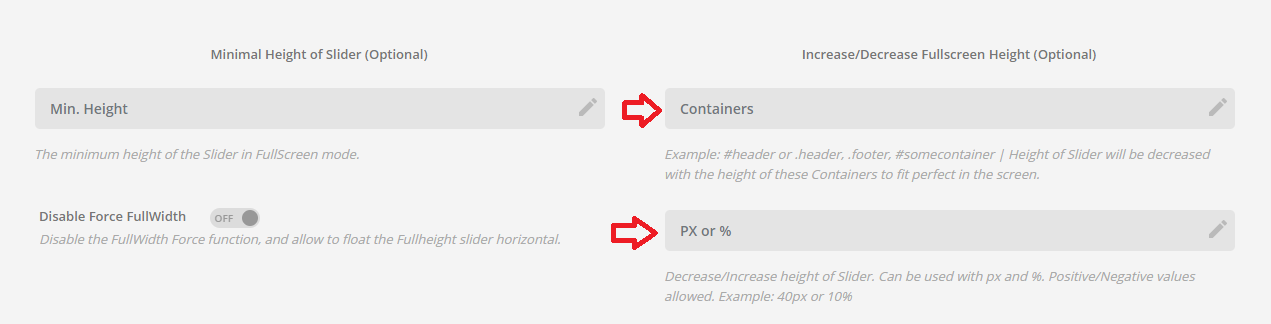
Yes, may not be sorted out soon. ConvertPlus has its own responsive offset, so does the theme which will be harder to integrate both unless ConvertPlus will have a feature that could integrate external offsets. You can see this feature in Revolution slider where you can assign an offset or offset containers to create negative space and to give room for the header for preventing overlaps. But, it’s not something available in ConvertPlus. I love to see this feature in ConvertPlus too but it’s not our plugin.

The header fixed positioning of our theme is just using standard CSS position: fixed; so it shouldn’t have any problem. But it does because the plugin lacks the offset feature like in the Revolution Slider. And to list down the feature,

  1. Revolution slider has offset option

  1. The Pro header also has offset option

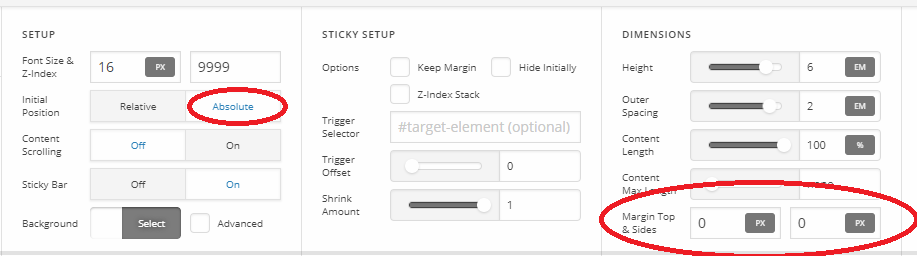
Which of course, just named as Margin Top but it’s actually Top since it has Absolute position (https://www.w3schools.com/css/css_positioning.asp).

But they aren’t connected to ConvertPlus offset as there is no similar option available in it. BUT, with the above screenshot, you can set your header position to absolute and set its Margin Top equal to the height of your ConvertPlus height (like 50). That should push the header down about 50px reserving a space for ConvertPlus. But again, since this space is given by the header and not by ConvertPlus, closing the ConvertPlus will not remove the reserved space.

And to use non-floating header, just turn off the Sticky Bar option in your header bars, just in the screenshot above.

Thanks!

Hello @Rad,

Would it be possible for a member of Themeco to contact them and start discussions?

Thank you for providing another option–I will most certainly give it a go. Failing that I will just have to find another location for the notification bar.

Hey There,

We already have informed our developers. They will communicate with the creators of this plugin and discuss a feature request to add a smooth transition when displaying the infobar.

Thank you for understanding.

This topic was automatically closed 10 days after the last reply. New replies are no longer allowed.