Content Dock Question

Hello!
I’m using content dock on my website. I have it enabled for all pages and posts, because people land on my site through various pages.

Say a person clicks the X button when it pops up. When that person goes to a second page, the content dock message pops up again. What settings do I need to adjust so that when a viewer clicks the X on one page, it doesn’t pop up for them on any other pages?

Thanks for your help!

  • Nadia

Hello Nadia,

Thanks for writing in!

Could you please update to the latest versions?
Our latest versions are:
- X theme 7.0.4
- Cornerstone 4.0.4
- Content Dock 2.0.4

This latest release contains fixes for several issues so be sure to check out the changelog (http://theme.co/changelog/).

After doing the updates, always remember to clear all caches (if you are using WP Rocket, WP SuperCache or W3 Total Cache) when updating so that the code from the latest release is always in use. This will help you to avoid any potential errors.

Please let us know how it goes.

Hello!

I updated everything but that did not solve the issue. Any more suggestions?
Thanks so much!

Hi Nadia,

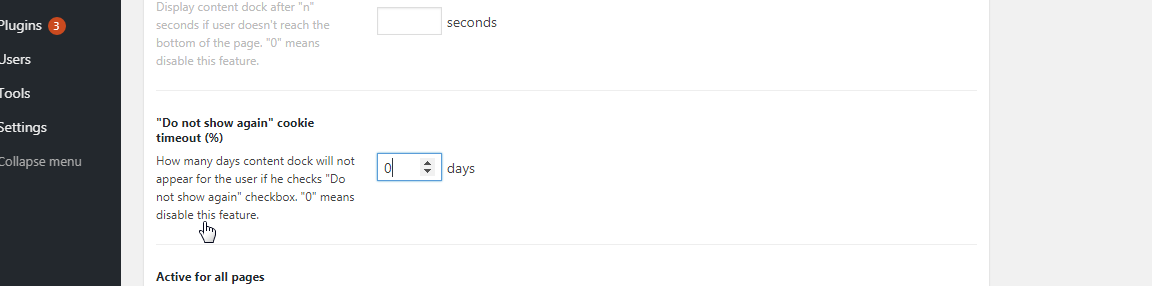
Please navigate to X > Content Dock and set the “Do not show again” cookie timeout (%) option.

This will add a “Do not show again” checkbox on your Content Dock, that if the user opts to, the content dock will not show on his/her end for a number of days.

Hope it helps,
Cheers!

Thanks for your help! :slight_smile:

Hi Nadia,

We’re so glad we were able to help you out. Please let us know if you need something else. Have a great day!

This topic was automatically closed 10 days after the last reply. New replies are no longer allowed.