Content columns - aligning images in different columns

Hi, hoping someone can help me - I have created a row with 3 equally spaced columns, each of these columns has and image, headline and button within them.

Each image is a different size, how do I get the columns to line up so that the image size is the same? I think I’m missing something obvious.

Here is what is currently looks like: https://prnt.sc/th4g47

I would like to have it so all images were the same height as the smallest one.

Thanks
Hi @nikhilp,

Thanks for writing to us.

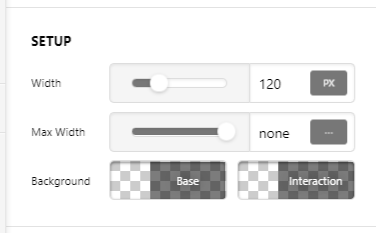
In images, you can only specify the width. Just remember that the images should have the proper aspect ration i.e 16:9.
You can get an idea of aspect ratio in this article.[ https://whatis.techtarget.com/definition/aspect-ratio]

In the screenshot, you can find an option to specify the width, and you can set the same width to all the images, it will come up with same dimensions if the aspect ratio is proper.

test_dc_Content_Pro (3)

Hope it helps.

Thanks

Thanks - I’ll have a looks for images with the same aspect ratio - figured it would be something obvious.

Hi @nikhilp,

Please let us know how it works.

Thanks

This topic was automatically closed 10 days after the last reply. New replies are no longer allowed.