Content box exact code and Image size issues

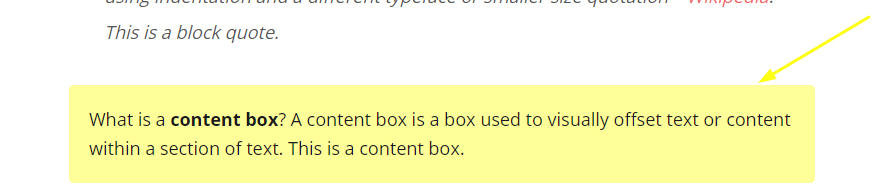
  1. How do I get that yellow highlight box on my blog post/ the exact one, the code shared are different ones, I tried edeting code myself and I could not figure it out. Can I please have the exact code for the same yellow, and same look. https://kristiehill.com/blockquotes-content-boxes/
==============================================================================

How do you make an image appear smaller in a blog post without changing the original size, when I try to make my image smaller in blog post it changes from original size to a smaller size, so I have to use the full size image in my post which is too big.

https://blogbymichelle.com/start-a-side-hustle-on-fiverr/ (The first image)

The first image here is larger in size than mine yet it appears smaller in blog post but when you download it it is a much larger image https://createandgo.co/work-full-time-make-5k-month-blogging/

Hi There,

To create a content box like that, you can try with this HTML:

<div class="content-box-yellow">What is a <strong>content box</strong>? A content box is a box used to visually offset text or content within a section of text. This is a content box.</div>

After that add this custom CSS under X > Theme Options > CSS:

.content-box-yellow {
margin: 0 0 25px;
overflow: hidden;
padding: 20px;
background-color: #FFFF99;
border-radius: 5px;
}
.img-max-width {
    max-width: 50%;
}

To make the images smaller in your post content, when you insert the image to post content, add the img-max-width to your images:

Hope it helps :slight_smile:

Thank you, the first one worked but not the second
When I make the image smaller in post the original size of photo also changed

Example: The first image on this page is 683 x1024 but is not displaying its actual size in post, however when you download it or pin it to pintrest it is still the actual size. https://createandgo.co/work-full-time-make-5k-month-blogging/

Hi There,

Thanks for the update!

I can see you are using lazy load plugins for the image, which causes the image to load in the different size for faster load.
Please disable the plugin, the image will load exact size you expect. We are really sorry but there is nothing to do with theme side.
Thanks

This topic was automatically closed 10 days after the last reply. New replies are no longer allowed.