Hi There,
i’m using the content band and I’m trying to align the text inside in the very bottom.
Can you help me with that?
thanks

Hi There,
i’m using the content band and I’m trying to align the text inside in the very bottom.
Can you help me with that?
thanks
Hello @apxds,
Thanks for asking. 
Please try adding margin-top: 50px under Customize > Element CSS of Custom Headline element. https://cloudup.com/cBm_461m41N
Let us know how it goes.
Thanks.
Hey there,
I tried but nothing happens
tried:
$el.custom_headline {margin-top: 50px}
and
$el {margin-top: 50px}
and other idea?
thanks
Hello @apxds,
Thanks for asking.
I see that you have added few inline CSS in headline text. I have changes the values of margin-top to 80px. Please adjust that value as per your requirement. https://cloudup.com/cXobnLBNZNY
Thanks.
Hello
I still have the same initial problem.
I tried to add “margin-top: (different values) px” inline and under Customize > Element CSS
nothing happens. The text doesn’t move up or down.
As I said, I want the text to align at the bottom of that image… any help?
Thanks
Hey @apxds,
Try increasing the margin-top to 325px.
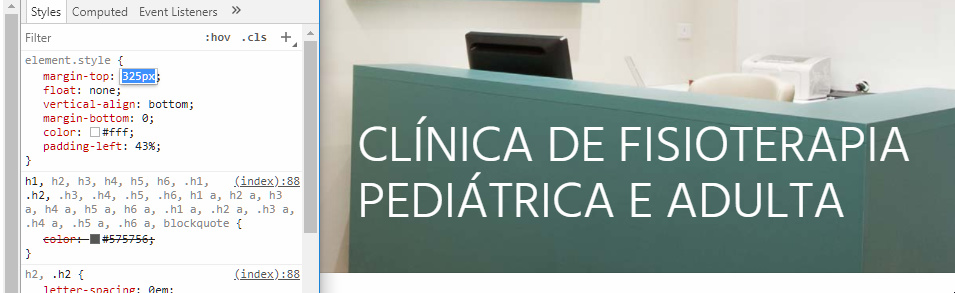
I would recommend that you use the element controls though rather than manually coding. See https://youtu.be/A2aOVa9tG7U
Thanks.
Hi @christian_y
thanks for the example and for suggesting another way to do that. 

You’re welcome.
This topic was automatically closed 10 days after the last reply. New replies are no longer allowed.