Content area not showing... content in the editor!

Pro v2.2.0

I have created a Justified Image Grid shortcode and placed it alone in a Content Area within section 2, and as soon as I select another section 1, the contents of section 2 disappear, and I cannot get back to edit them.

The JIG gallery shows on the page perfectly as designed, but I cannot get back to edit it.

This also happens if you delete the standard “This content will show up directly in its container.” Text and select another section. There is then no qway to edit the contents of that section again and only deletion and remaking are a fix.

Any clues?

Thanks
Hi @synner,

Thanks for reaching out.

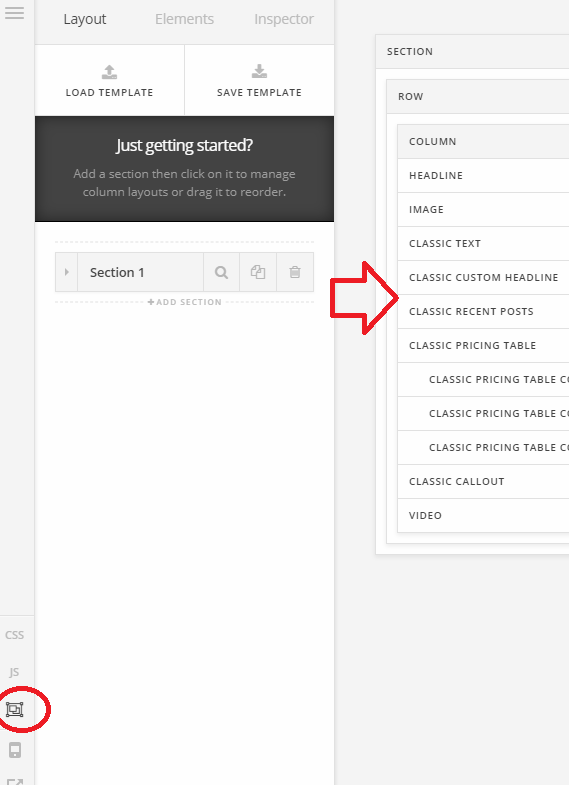
You mean you add a shortcode in the content area and it became unselectable since it’s blank? If that’s the case, you can edit it through skeleton mode. Or do you use HIDE DURING BREAKPOINTS option to control the section?

For the meantime, please try the skeleton mode to edit existing elements that aren’t being displayed from the preview.

Cheers!

Thanks for the reply.

Skeleton mode is the answer for now. Is this something that will be sorted in a future release? I don’t necessarily need to see the gallery in the preview, but to see the code would be good :wink:

Thanks

Hello There,

JIG plugin is not supported in Cornerstone that is why it is not showing in the preview area. The best way to edit the pages is to use the skeleton mode to see all the elements that is not shown in the preview. As of this moment, most of the grids like the grid or essentials and any other 3rd party grids like the JIG plugin is not supported and not displayed in the preview area to avoid any conflicts in the Cornerstone preview area.

Hope this helps.

Hi.

As I said, I can definitely live without the preview, but the lack of the ability to edit the code without going to skeleton mode is a pain.

Thanks

Hey There,

Regretfully as of this moment the only way you can edit a shortcode that you may have added on the page that does not have any preview can only be done in skeleton mode. We can add this as a feature request so it can be taken into consideration for future development.

Thanks.

Thanks for that. I’ll look forward to it. :sunglasses:

You’re welcome, @synner.

This topic was automatically closed 10 days after the last reply. New replies are no longer allowed.