Components not showing on the website

I have a kind words aka reviews component on every single one of our pages. I have not messed with them or edited them in a long time. However, today, we were working on the backend and our kind words section won’t show up. It says that it is still there and all of the components are in the correct spot but they are not showing up on our live website but they will show up on the mobile version… pictures attached https://drive.google.com/drive/folders/1uDnX07bJX1qwC__1jpqL_HGp47ZuoR5K?usp=share_link

“no reviews on live site” “mobile photo with kind words” “backend showing reviews should be there”
Hey Ashley,

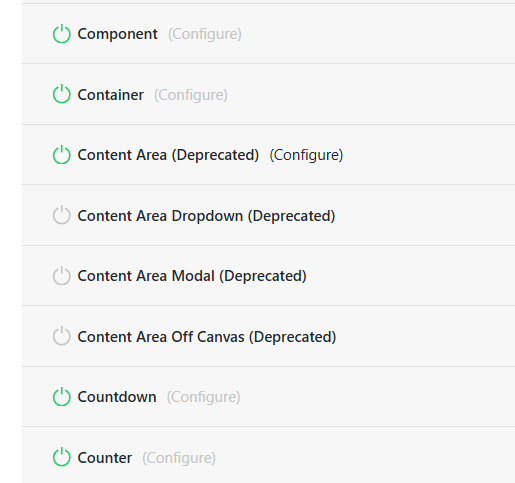
I have investigated the issue and it turns out that you were using the Classic “Content Area” element. Be advised that classic elements are deprecated and disabled by default. You will have to go to Cornerstone > Settings > Permissions > Elements > Content Area and enable it.
image

By the way, I already enabled it. You should be seeing the reviews on the page now.

Make sure to clear your browser cache before testing the page.

Cheers.

Thank you so much for doing that. However, they are still not showing up on our website. If you go to revealhm.com and click on any of the locations the kind words are missing as they should be in between those 2 pink lines below the “services” button. Please advise. Thanks

Hey There,

I have checked all the location pages, and I DO see the “Kind Words”.

You may be experiencing some caching issues. Clear your browser cache and test the pages again.

Thanks.

Hi. It is not just me that is seeing it. My boss is also seeing is not seeing it on their end either. Here is the link im not seeing them from https://revealhm.com/austin/

Hey Ashley,

I am seeing it on my screen:

Your computer and your boss’s computer may be serving the cached version of the page. You may need to log in to your Cloudflare account, purge your site cache, and activate the Development Mode.Most probably ask your boss to clear his/her browser cache or use private browsing mode before testing the page again.

Cheers.

This topic was automatically closed 10 days after the last reply. New replies are no longer allowed.