Hi there
We have a new product in Woocommerce which is a kit. It is available in three variations. What we would like to do is have a comparison table within the Cornerstone content area which allows a comparison of the kits.
More information on the kits- The three variations of the kits are: basic, advance and complete. These kits can contain up to 30 product items. For example, the basic kit contains 10 of these items, the advance kit contains 20 of these items while the complete kit contains 30 of these items.
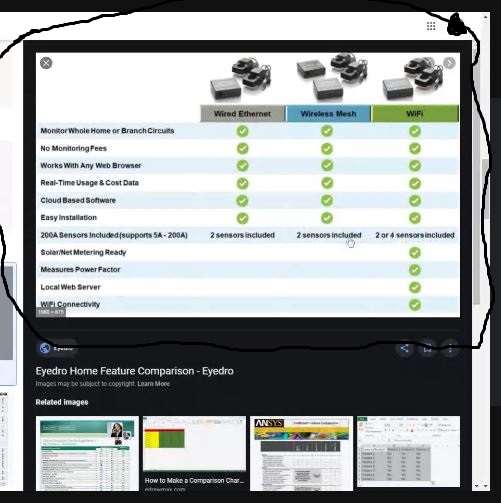
What we envision is a table with four columns
Column one would be the listing of the product items. The other columns would represent each of the kits. There would be a check box indicating which product from the product list is contained in the kit.
Here is an approximate example of what we are referring to:
To find a solution I went through the Cornerstone elements, but did not find one suited to what we need. The classic Pricing Table is somewhat like what we are looking for, but not close enough.
Perhaps making a four column row and using one of the cornerstone elements might work.
I also searched through the forum, and from what I read there isn’t a solution.
But I wanted to post this in case you had any suggestions.
We are using the latest version of theme X and cornerstone.
Thanks
Tim