Hi - I’m trying to add a column-rule with CSS on my top row and can’t seem to have it work.
Hello @ywoolf,
Thanks for writing to us.
I tried to access your site but the website is not accessible at the moment, in case you want to add custom CSS code on the column, I would suggest you please go to the Column—>Customize—>Element CSS. Now you can use this CSS selector class to add custom CSS code for the specific column.
$el.x-col{

   /*Add custom CSS code here*/

}
Please have a look at the given screenshot below.
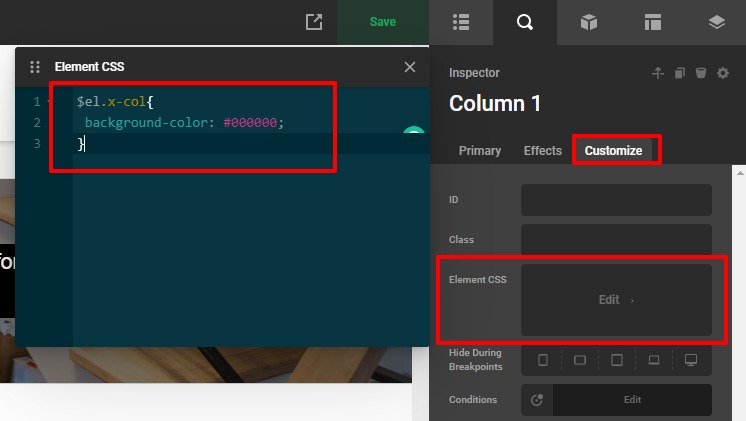
Writing custom CSS is outside the scope of our theme support. If you need customization, you need to learn CSS and learn how to use the browser’s element inspector or you subscribe to One where customization questions are answered.
Hope it helps.
Thanks
Hi - thanks - I’m quite good with CSS.
I’ve tried to put them the Column Element CSS for the Left Column, the Right Column and even the Row and nothing is happening…
$el.x-col{
column-rule: 8px solid #5F5853 !important;
}
I can see that the background css works but for some reason the column-rule isn’t working…
Thanks but I just added a left border and padding to the column for 3 widest breakpoints since it’s not recognizing column-rule:

Hello @ywoolf,
Glad that you were able to add the border on the column, I went ahead and checked the column-rule style on my localhost installation and it seems that it is working fine. Please have a look at the given screenshot below with the code.
Custom CSS code
$el.x-col{
column-count: 3;
  column-gap: 40px;
  column-rule: 4px double #ff00ff;
}

Output

The purpose of providing custom CSS is to show you how to add CSS code to your site. Writing custom CSS is outside the scope of our theme support. If you need more customization, you need to learn CSS and learn how to use the browser’s element inspector.In case if you have no idea about coding you can subscribe to One where customization questions are answered.
Hope it helps
Thanks
This topic was automatically closed 10 days after the last reply. New replies are no longer allowed.