Hi, got this issue in a row with for columns. see screenshot. the right columns is ok. the three on the left are chaotic overlapping…what´s wrong…?
Thanks,
cy.

columns-settings:
Hi, got this issue in a row with for columns. see screenshot. the right columns is ok. the three on the left are chaotic overlapping…what´s wrong…?
Thanks,
cy.
columns-settings:
Hi @cyrock,
Thanks for reaching out.
It’s flex alignment bug on IE11, and it seems the auto and 100% width are completely different measurement for IE. The fix is adding a 100% width to the text element instead of auto. Please check this screenshot.
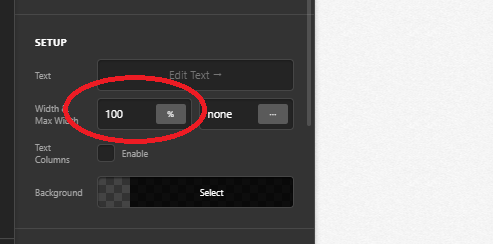
Thanks!
hi! ok, thanks for your reply…yes, but what´s the correct setting for the column or the text element? “auto” or 100%?
regards,
Cy.
Hi @cyrock,
The correct one is auto since it’s CSS standard https://www.w3schools.com/cssref/pr_dim_width.asp.
It’s just that IE11 doesn’t support most modern browser standards, you’ll have to add 100% for IE11.
Thanks!
This topic was automatically closed 10 days after the last reply. New replies are no longer allowed.
