Hello,
You already helped me on this but, I’m still having issues. The space between the icons and the texte is too much and I can’t change it. Even with “Custom column” I’have tried to put 1/8 + 1/3 +1/6 + 1/8 + 1/3 but it doesn’t even change a bit.

Thanks in advance !
Hello @joycre,
Thanks for asking. 
I tried looking at the website URL’s you have assigned on the licence but I couldn’t find the page. Can you please share exact page URL for us to take a closer look?
Thanks.
Hi There,
Thanks for the details!
I checked the page section with image icon and text. The way you are trying to make it would have the issue. Because column element doesn’t have more option than the current you have.
I would suggest you use classic feature list instead of the separate column for image and text.

Making the column element like you want needs custom CSS which is not advisable. But you can try adding -max-width to the image and text column to adjust as per your requirement.

Hope this helps!
Hi,
Thank you for your reply. The gap problem is resolve thank you. But I am having another problem; I don’t know how to use image instead of icons.

Hi There,
If you are using classic feature list, there is the option to switch from icon to image or number.
Please check the screen shot.
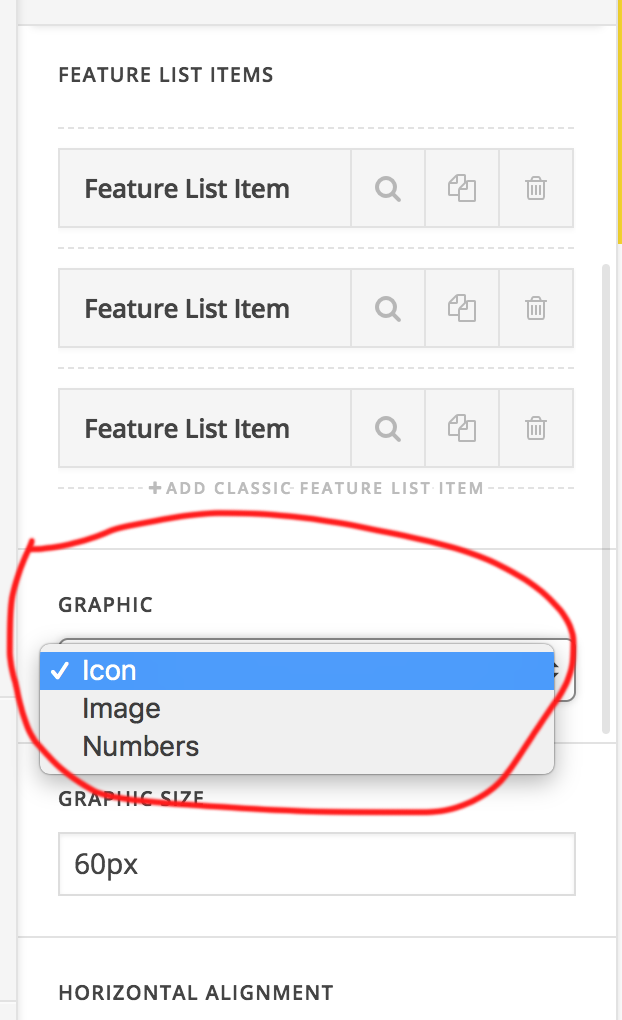
If you are using the classic headline or classic icon list, we are really sorry there is no option to change an icon to image.
Thanks
This topic was automatically closed 10 days after the last reply. New replies are no longer allowed.