Column buttons equal height & Footer problem

Hi there,

I am currently having two problems while using the Pro theme and I’m hoping support can help me with this.

  1. On my main page, I have three columns on a row and each column has a title, text and button. I need all three buttons aligned vertically at the bottom. Currently it looks like this :

Upon searching the forum, I’ve come across the following CSS and added it into my Page CSS

.flexme.x-container {
display: flex !important;
flex-wrap: wrap; /wraps the columns on mobile view/
}
.flexme .x-column {
display: flex;
flex-direction: column;
justify-content: start;
align-items: center;
align-content: space-around;
padding-bottom: 2em;
}
.flexme .x-column .x-anchor-button {
margin-top: auto !important; /push the buttons on the bottom of columns/
}

And also added “flexme” to the row class in the customize section but it’s still not working. I’ve searched other methods on the forum but none of them work.

  1. I have created a photo gallery using Essential Grid but for some reason when I load the page, the footer isn’t automatically pushed down (creating a scrollbar) to match the length of the gallery but instead goes beneath the footer and I am unable to scroll to the bottom. I am not using any custom css on the footer.

Please help!
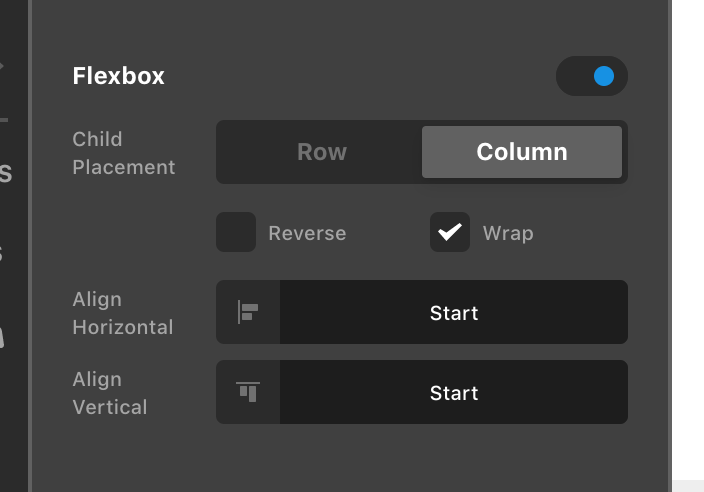
Howdy, @flixid! You do not need any custom code to achieve what you’re trying to do with bottom aligning the buttons, this can all be done natively. To accomplish this, inspect each of your Columns in that Row and turn on the Column’s internal Flexbox layout, and use the following settings (this should be the default unless you’ve otherwise changed it):

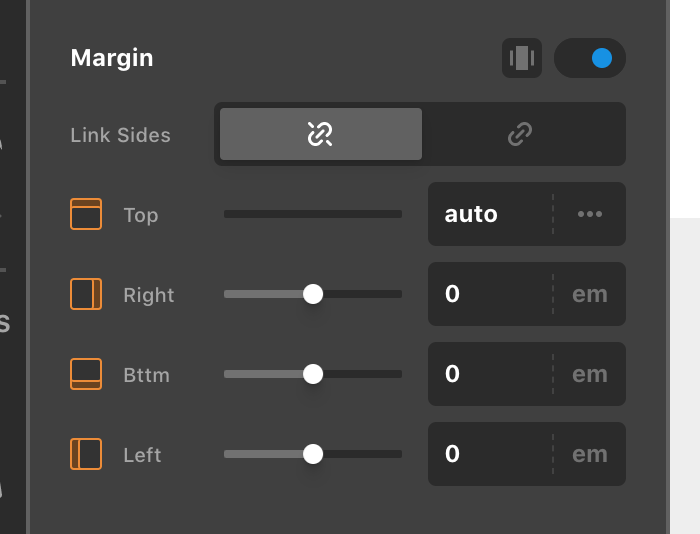
Now that the Column’s internal Flexbox layout has been enabled, we can utilize the Margin control of our Buttons to push it away from the content so that it is aligned to the bottom. To do this, set each Button’s Margin control to the following:

Once the Top value has been set to auto, this will push the Button towards the bottom of each Column. Remember that these Flexbox controls on the Columns and Margin controls on the Buttons must be setup for each instance. That should give you the result you’re after.

As for the 2nd issue, I am not seeing this problem happening on your site…it appears you have switched the gallery to use pagination. With that setup I’m not seeing the footer overtake the content in any way.

Hopefully this all helps to point you in the right direction, cheers!

  1. Column buttons equal height.
  • Works perfectly, thanks!
  1. Footer problem
  • I temporarily reduced the “Max Visible Rows” in Essential Grid to 2 and only then will the whole gallery grid including pagination fully show in the page. If I were to change the value to 3 or more, the content will disappear under the footer (as shown in the screenshot above).

Hello Andy,

The grid and footer issue is because you have set a maximum height of 500 pixels in your last column.

I went ahead and set it to none already. You can change the grid settings now and test your page again.

Regards.

This topic was automatically closed 10 days after the last reply. New replies are no longer allowed.