How do I get colored credit card icons on my checkout page? All of mine are greyed out
Hi There,
Please try adding the following CSS under X > Theme Options > CSS:
.stripe-pf {
    color: #002fff;
}
Hope it helps 
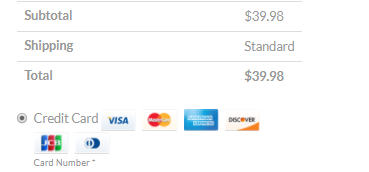
I meant the actual colors for each of these companies. Here is what I want it to look like:
Hi There,
Thanks for asking!
Unfortunately the strip payment plugin doesn’t have option to add image icon for the credit.
It by default having font icon which has only option to change a single color.
To add image icon you need customisation of the plugin, which is beyond our theme support scope.
Thanks for understanding.
This screenshot is from a website using the X theme so I know it’s possible. The code on the site, though, doesn’t work on mine
Hello there,
It could be that a developer did this customization on their website.
We apologize we can’t handle this kind of support as this is outside of our scope just like what my colleague said. I suggest you hire a developer to do this for you.
I can however share you a link as you’re right that this is possible:
Thank you for your understanding.
This topic was automatically closed 10 days after the last reply. New replies are no longer allowed.