Hello,
I have a clean WP install, which I installed the X theme and X child theme. I then tried to install the App Demo content, and I received the error:
Uh oh! The preview HTML did not include a closing </head> tag. It may fail to load or work properly.
Here’s a screenshot of the error: https://snag.gy/0VqbZv.jpg
This is the second time I’ve tried to install this demo content. (I previously tried to install this content, and when it failed, I uninstalled the entire WP installation and started over.)
How can I get this demo content to work properly? Thank you.
Hello There,
Thanks for writing in! This error usually occur when you have enabled W3 Total Cache plugin and you have minified the HTML, JS and CSS files. Please deactivate any caching plugin such as W3 Total Cache or Autoptimize plugin. Caching plugins are best to turn on when you are finished building the site.
Hope this helps. Please let us know how it goes.
The only plugin I had installed before installing X theme was the “SG Optimizer” plugin (proivded by SiteGround hosting). After installing the theme and before installing the demo content, i installed the following “extensions” (plugins) that accompanied the theme:
Contact Form 7
Cornerstone
Slider Revolution
UberMenu 3
I tried deactivating SG Optimizer and reinstalling the demo content, but I am still getting the error.
Hey There,
SiteGround has a caching mechanism too. Please clear your site cache and test again. If nothing is working, please provide us access to your site so that we can investigate further.
Thank you.
- I removed/deleted the entire WP install.
- I turned off caching at the server.
- I uninstalled WordPress and started with a completely fresh install - NO OTHER PLUGINS.
- I reinstalled the X theme and child theme.
- I installed and activated Slider Revolution.
- I installed the “App” demo content.
THE ERROR IS STILL THERE.
I will send login info in a subsequent private message.
Hello There,
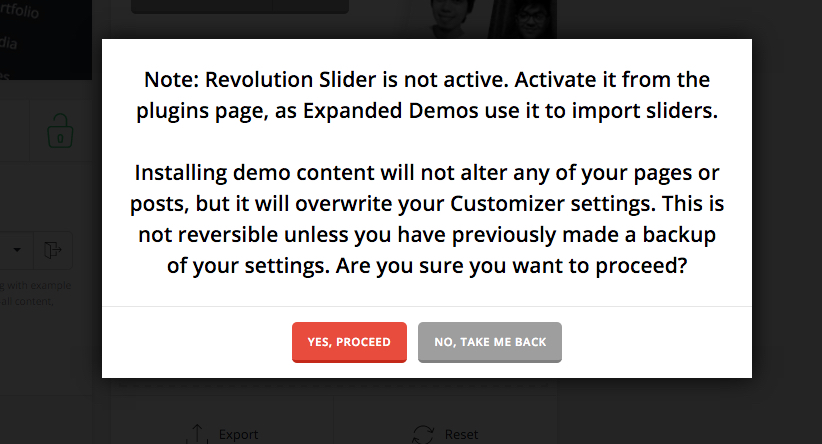
I have logged in and I figured out what is wrong in your site. It turns out that when you imported the App Demo Content, the revolution slider was not installed or active which resulted to the sliders in the demo being not included during the import. So I went ahead and imported the needed sliders. It is working fine now.
Please check your site.
Like I said in my previous post (#5), and my message before that (in the plugin list), I had installed and activated Revolution Slider. I’m certain of that, because the demo confirmation message did not include the “Note: Revolution Slider is not active…” like it does here: https://s3.amazonaws.com/community-themeco/app/uploads/2016/03/28140556/demo-content-message.jpg
But whatever… as long as it is working now. Thanks.


This topic was automatically closed 10 days after the last reply. New replies are no longer allowed.