Hello,
How can I adjust my photos on my Classic Slider (http://www.thefranklife.com/speaking/) so they are the same size and not blurry?
Any tips as it is my first time using this.
Hello,
How can I adjust my photos on my Classic Slider (http://www.thefranklife.com/speaking/) so they are the same size and not blurry?
Any tips as it is my first time using this.
Hey @fmacri,
I’ll discuss first about the image being blurry. I downloaded the full sized image and checked it’s resolution. It is a high resolution image but it looks blurry so it looks like the issue is with the image itself. It looks like its due to how the image was captured. Can you try creating a test page and try out some free HD stock images and see if they are blurry in the page?
I see your site’s max-width is 1000px and the actual image size you’re using is 1024px in width. That is fine as long as you use an image size more than 1000px in width. If you use lower than your Site’s Max Width, it will be blurry. But, this is not the case here.
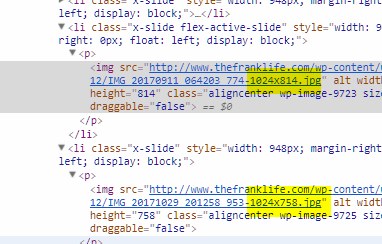
Now for the same image size, there is no option to adjust the image size in the Classic Slider. But, you can use a plugin like Simple Image Sizes to generate your own image size (remember it must not be lower than your Site’s Max Width) and use that in the slider. Another method is adding your own image size by using the image size function which I personally don’t recommend because this requires custom development.
Thanks.
This topic was automatically closed 10 days after the last reply. New replies are no longer allowed.
