Hi guys!
While I have no problem to customize the Popover ‘Classic Image’ element, the specific popover’s arrow color (see enclosed screenshot) seems restive to my CSS gibberish.
With thanks in advance,
B.
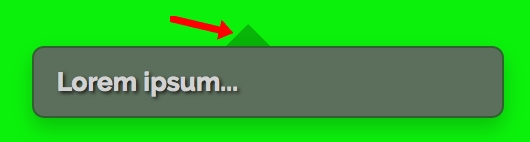
Hi guys!
While I have no problem to customize the Popover ‘Classic Image’ element, the specific popover’s arrow color (see enclosed screenshot) seems restive to my CSS gibberish.
With thanks in advance,
B.
Hi there,
Thanks for writing in! Try adding the following code in the Theme Options > CSS:
.popover .arrow {
    border-bottom-color: red !important;
}
Feel free the change the color as per your need in the above code. If you would like to learn CSS, I am sharing few resources that you take a look to get started with CSS and an interesting tool that you can use to speed up the development process.
I recommend you to watch following video that will help you to get started with CSS.
Sometimes it can get a bit difficult to find out the right selector to be able to write the required CSS codes. A handy tool that can help you in this is Google Chrome dev tools. I am sharing the resource that you can refer to get started with dev tools.
https://developers.google.com/web/tools/chrome-devtools/css/
Let us know how this goes!
Hello and many thanks for your pertinent advices! 
(My mistake was a typo in “border-top-color: …;”)
B.
You are most welcome!
Glad that we could help you!
This topic was automatically closed 10 days after the last reply. New replies are no longer allowed.