Classic Featured List Styling

Hi,

Appreciate if anyone can help me out designing the classic featured list. I have the list as used here: https://demo.theme.co/band/releases/

In the above example, graphics and text aligned left and right respectively.

I want the graphics will remain as it is but texts on each side. Example: for 1st graphic text will be placed to the left, for 2nd graphic text will be placed right. Wondering if this is there in the settings.

For better understanding please refer this theme demo section “OUR WORK PROCESS” under this link: https://codex-themes.com/thegem/starting_page/themes.php?page=agency-dark

Thank you,
Jay
Hi Jay,

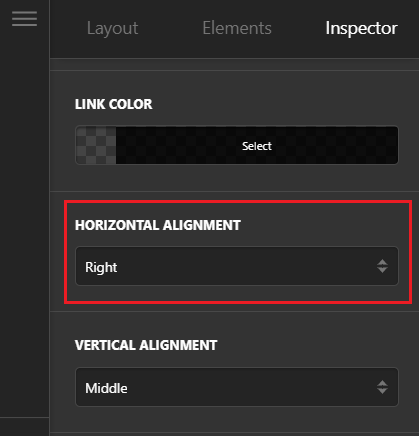
Thank you for reaching out to us. This could be possible with custom CSS, but this would be outside the scope of support we can offer. You probably can achieve this with multiple Classic Featured Box elements and use Horizontal Alignment option for each element, however to make it similar to your design custom CSS would be required.

image

Thanks for understanding. Take care!

Hi Nabeel, Thank you for your view.

Yes, it’s possible with multiple Classic Featured Box elements with Horizontal Alignment. I tried that earlier. But connectors won’t connect separate Classic Featured Box. It only connects to elements inside one Classic Featured Box.

Will do it with CSS then. :slight_smile:

You’re welcome, Jay.

This topic was automatically closed 10 days after the last reply. New replies are no longer allowed.