Hi there, I have recently installed a child theme to Xtheme and am using the Renew Stack. The child theme seems to have overwritten my font-family in some areas of the site. ‘Raleway’ is selected as the font-family in appearance-customize-typography but for some reason in my blog posts there is a different font? I would like font-family to be across the entire site. Please can you help me resolve. Thanks, Laura
Hi There,
Is this your website: http://iwmlbproject.com/?
I could see that you’ve updated the Cornerstone plugin but the X theme hasn’t been updated yet. Could you please update it to the latest version also?
Thank you.
Hi Thai
Yes, this is my website. I have now updated X theme. None of my text is Raleway now even though it lists Raleway as the font in appearance-customizer.
Thanks
Laura
Hi, it seems that the update has reverted my site back to X theme and not the child theme? Thanks, Laura
Hi There,
I could see the Raleway font is working fine on your headings.
Please make sure you’ve already added the Body Font like this screenshot in the Font Manager:

After that navigate to Theme Options > Typography > Enable Font Manager:
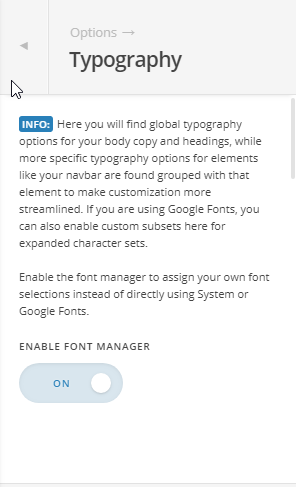
Also set the Body font:

If it still doesn’t work, please provide us with your admin account so we can take a closer look.
Thanks.
Thank you, this has worked!
1 Like