Child theme CSS changes are not reflected on dev site

For example,

If I go into the Pro-child theme folder, and edit the style.css file adding the following line:

.page {max-width: 50%;}

No change is reflected.

If I go into the theme options and add the same code into the Global CSS section, the change is made and updates immediately.

What am I missing? If I can’t change the CSS in the child theme folder, what is the point of having a child theme at all?
Hi Stephen,

Thanks for reaching out.

Please make sure to add !important

.page {max-width: 50% !important;}

Hope this helps.

Adding !important does not solve the issue.

Neither does adding body, #top, or .site

This is a fresh install of the latest Wordpress, Pro Theme, and the Pro-child theme as downloaded from theme.co

There is no cache plugin on the site, and the child theme is activated.

Thank you

Hi again,

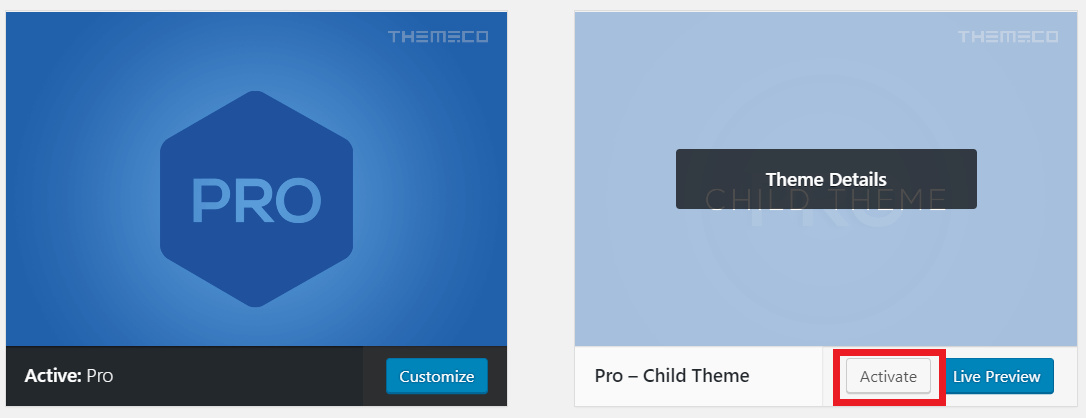
I checked your setup and it looks like your child theme is not active although you’ve mentioned it’s active (see secure note for the site link I checked). Please navigate to Appearance > Themes then find your Pro - Child Theme and activate it (see screenshot)

Let us know how this goes!

This is not the site in question, I am referring to a dev site that is offline.
I am trying to rebuild the live site from scratch with some different functionality.

The offline dev site is where this problem is happening. Sorry for not mentioning that earlier.

Thanks


UPDATE:

With absolutely no changes to anything, the changes in the child theme’s style.css file now reflect on the site.

I can’t explain the cause of problem or solution, just that it now works as it should. It took 3 days before it worked as it should.

Thanks

Hi there,

This could be a browser’s cache issue, Always make sure to clear all caches after making any change. We’re glad the issue is resolved now.

Cheers!

This topic was automatically closed 10 days after the last reply. New replies are no longer allowed.