Checkout & sales page format

Hi Themeco team,

I’m trying to change the checkout page template so that is does not include the sidebar from the blog - at the moment i get this -> https://www.screencast.com/t/IfW3U6eeqZ

On the page settings I’ve selected container with header and footer, so the side bar shouldn’t show - but it does. Can you help?

Also I have a strange misalignment on the in-shop purchase buttons here -> https://www.screencast.com/t/iM2ejm42

Can you help me correct this?

My URL is; honestyforyourskin.co.uk

Thanks so much,

Cheryl
Hi there,

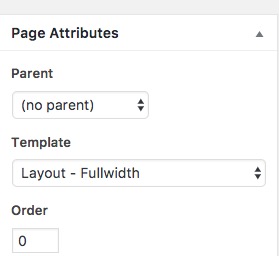
Please kindly go to the Pages list on your Wordpress dashboard. Search for the page called cart. Go to that page and set the page template to:

That should do the trick regarding the cart page.

Regarding the alignment of the add to cart button, would you please kindly update the theme to the latest version and make sure that there is no custom CSS code causing the issue?

Thank you.

Thanks Chris - worked a treat.

To update my Theme, if i use this option -> https://www.screencast.com/t/GUY8KtJz464 my changes in the child theme will not be affected?

How do i now access the global css for the product page? Before i could bring up the customizer to view this, however now, this css page views as blank.

Thanks so much,

Cheryl

Hey there,

Updating the theme won’t affect the child theme. Regarding the CSS I’m not sure what you mean by Global CSS for product page, however you can access the Global CSS via Theme Options > Global CSS or via Appearance > Customize > Custom > Edit GLOBAL CSS

Hope this helps!

Hi Nabeel,

Thank you - I’ve got to it now… your colleague asked me to check there was no custom CSS causing the issue I’m seeing on the product page.

This is the custom CSS i have -> https://www.screencast.com/t/GgMYqDBO7nU

However by altering these values/removing some - I cannot fix the alignment change.

Are you able to help?

Thanks Nabeel!

Cheryl

Hi Cheryl,

The issue is because of this custom CSS specifically the float property:

.woocommerce .price, .woocommerce .quantity {
    float: left;
    margin: 0 0px;
}

We need to issue a clear after the float elements which is the form holding the input field and add to cart button. To understand better see this: https://www.w3schools.com/css/css_float.asp

See this: https://screencast-o-matic.com/watch/cb6lfpIGbm

.single-product.woocommerce .cart {
    clear: left;
}

Hope this helps.

Thanks so much Lely!

I’m also trying to sort something similar here -> http://www.honestyforyourskin.co.uk/skincoach-reccomend-me/

First; I’m trying to remove the boarder with a code like this - .product woocommerce add_to_cart_inline {border: 0px;} but it doesn’t work, can you tell me what I’m doing wrong?

Second: Is there a way to get the cart button to appear inline and after the add to cart button using the float & clear properties you shared?

Thanks so much lovely,

Cheryl

Hi again,

  • To remove the border, replace your code with the following code:
.product.woocommerce.add_to_cart_inline {
    border: 0px !important;
}
  • For the cart button, you may try adding the following code in your Customizer:
.el5.x-column .x-raw-content {
    float: left !important;
}
.el5.x-column .x-accordion {
    clear: both !important;
}

Hope this helps!

Hi Nabeel,

Thank you! Works a treat.

Do you know how to add some space between these elements -> https://www.screencast.com/t/iozwq17VJy

The price also looks like it already has a space proceeding it, although i haven’t added one, can i remove this?

Thank you so much,

Cheryl

Hey Cheryl,

Glad that worked. To fix the spacing issue, you can try adding the following code in your Customizer as well:

p.product.woocommerce.add_to_cart_inline {
    padding: 12px 0 !important;
}
.product.woocommerce.add_to_cart_inline span.woocommerce-Price-amount.amount, .product.woocommerce.add_to_cart_inline .add_to_cart_button {
    margin-right: 20px;
}

Cheers!