Changing the colours of the global headers on POSTS (not pages)

hi I am using the icon on the X theme and I like to have the global headers on a darker choir as the text. But it seams that I can only change that on the Pages and not on the POSTS? is that correct?

how to I do this change on the posts?
I use a CSS to change the sizes of all Headers that has worked but not the Colour?

thanks for your help

Hi Corina,

Thanks for reaching out.
It works globally irrespective of page or posts, there might be something else that is the reason behind your issue, it will be very difficult to recognize the issue without investigating through the admin dashboard. Can you please provide login credentials for your site in a secure note to examine it further, including:

– WordPress Site URL & Login URL
– WordPress Admin username/password

To create a secure note, click the key icon underneath any of your posts.

Thanks

Hello @Scalentse,

I checked your site it seems that you are using multiple plugins for cache and CSS/JS minification. I went ahead and clear the cache, it seems that it is working fine.

Please have a look at the screenshot in the secure note. I would suggest you clear your browser cache and temporarily deactivate the cache plugins then check it again.

Thanks

Sorry but I don’t think you understood the problem.

I am talking about the H1, h2, H3 … headers. on a blog Page. they are blue , but not on a blog post they stay dark grey like the fonds colour.

the same if if I add a URL to a text on a PAGE it is blue and when hover over it get red, But on POSTS there is no change and I change it manually .

you are talking about Cache plugins and Css are you able to tell me which one is double and which on I should delete ?
thanks

Hello @Scalentse,

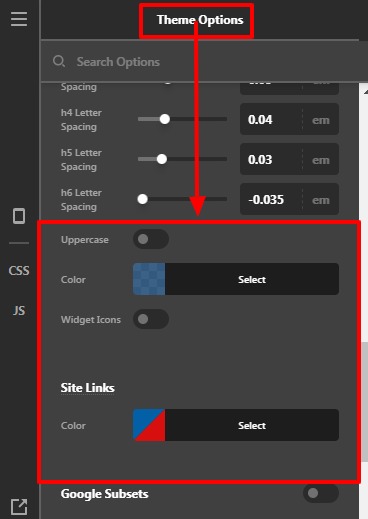
Sorry for the confusion. I went ahead and checked your settings, the pages H1, H2, H3, H4, H5, H6 heading fonts are rendering from the Theme option —>Typography—>Heading.

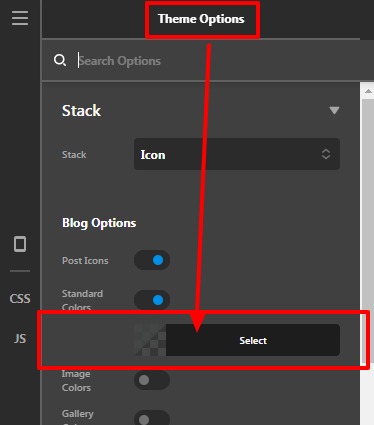
On the Post page, the Heading font is rendering from the Theme Option —>Stack —>Icon—>Standard Colors.

Theme-Options-X (2)

You are using “SG Optimizer”, “WP-Optimize - Clean, Compress, Cache” these two plugins for the cache and optimization. I would suggest you use only one of them.

Hope it helps
Thanks

This topic was automatically closed 10 days after the last reply. New replies are no longer allowed.