Changing page background color / removing headings

Hi,

New to using X, I’ve been able to get a good bit of the way to where I want my site to be using the Agency as a starting point, however, I can’t figure out a way to either:
A) make my subpages like http://chipmaestro.com/retrotainment/index.php/projects/ full width like the homepage http://chipmaestro.com/retrotainment/
or
B) change the background color of the main content area on them and hide the wordpress generated page titles.

any help would be greatly appreciated!
Thanks!
Hi there,

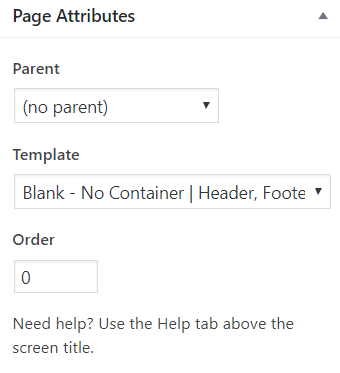
Thanks for writing in! To make your sub pages full width please select Blank - No Container | Header, Footer Page Template under Page Attributes in WordPress page editor (see screenshot)

To disable page titles, select Disable Page Title option under Page Settings in WordPress page editor (see screenshot)

Hope this helps!

Oops, it’s been a minute since I built a site in WordPress and I was able to find the rest of the styling options inside of Cornerstone, so I forgot to check the old obvious places. Thanks!

You’re welcome!
We’re glad we were able to help you out.

This topic was automatically closed 10 days after the last reply. New replies are no longer allowed.