Changes in Inner Conatainer for rows

Hi,

I use the Inner Container DESIGN SETUP for most of the rows in the website, but I’d like a bigger margin to the right and left for this container in many cases (even with the Marginless Columns Off).

How could I change this margin in general for all the containers? And how to change one container in particular when needed?

Thanks in advance.

Regards,

Beatriz

Hi There,

Thanks for writing in!
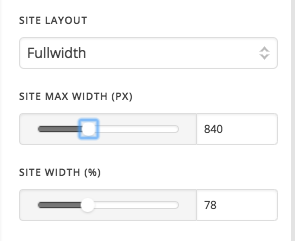
If you want to increase the margin on both side of the row. You can set a max width so that the row will get more space in both sides.

If you want to make it global then Please change the container width setting in Theme Option -> Layout and design

Hope this is something you are looking for.

Thanks

This topic was automatically closed 10 days after the last reply. New replies are no longer allowed.