Hey @gallagherBD,
This could not be done using simple CSS. This requires WooCommerce custom development and therefore is outside the scope of our theme support. The most I could do is lead you to the right direction. Please check the info below.
###For changing the WooCommerce Tab order, please visit the link below.
###For moving the Review Form in the Reviews Tab, there are 2 options.
-
(Laborious but recommended) Copy single-product-reviews.php which is located inside wp-content\themes\x\woocommerce to your child theme’s woocommerce folder. Create the folder if it does not exist. Then, you’d basically need to swap out the position of the Comments block of code and the Reviews block in the child theme. The screenshot below shows the collapsed structure but there’s a lot of code inside the blocks.
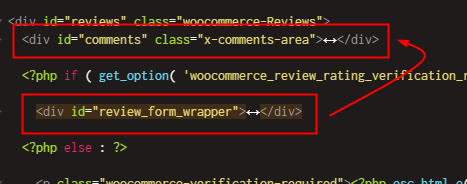
-
(Copy paste method but can be affected by Javascript conflicts) Add the code below in Theme Options > JS.
jQuery(function($) {
    $('.single-product #reviews').prepend( $('.single-product #review_form_wrapper'));
});
You’ll then need this override CSS to be placed in Theme Options > CSS.
.single-product #reply-title {
    margin: 0;
}
.single-product #review_form_wrapper {
    margin: 0 0 40px;
}
Please just note that we are not responsible if the suggestions here breaks your site now or in the future. In that case, you’ll need hire a developer.
Hope that helps and thank you for understanding.
