Change logo on scroll

Hello!

I’ve already change the navbar from transparent to solid color on scroll, Is it possible to change the logo on navbar with the scroll?

What I want to do is have my logo on white, just like the links, and when the page scrolls change the logo to full collor.

Is this possible?

Thanks!

Hi There,

Thanks for writing in! To assist you with this issue, we’ll first need you to provide us with your URL. This is to ensure that we can provide you with a tailored answer to your situation. Once you have provided us with your URL, we will be happy to assist you with everything.

Thank you.

Hello!

Sure, the url is http://web.sirkubo.com, it’s secured, but I’ll put you the password on secure note

Thanks!

Hi there,

Please add this code in the custom CSS:

.scroll-nav a.x-brand {
    width: 250px;
    height: 105px;
    display: block;
    background-image: url(URL_OF_THE_IMAGE);
    background-size: cover;
}

.scroll-nav a.x-brand img {
    display: none;
}

Hope this helps.

Hello @Jade

The code worked like a charm!.. but now I’m facing another problem, the menu on the mobile version can’t be seen! :slightly_frowning_face:

On mobile the background of the navbar has to be white and with the full color version of the logo

Would you please tell me how I fix this?

Thanks again!!!

Hi,

We can no longer access your site using the password you provided.

You can try adding this in Custom CSS

.x-navbar .mobile .x-nav li>a {
   color:#fff;
}

Hope that helps

Hello @paul.r

The password is unchanged, I don’t know why you can’t access.

What I needed to do is that the menu on mobile have solid white color, I’ve corrected that using:

.x-navbar .mobile .x-nav {
background-color: #fff;
text-align:center;
}

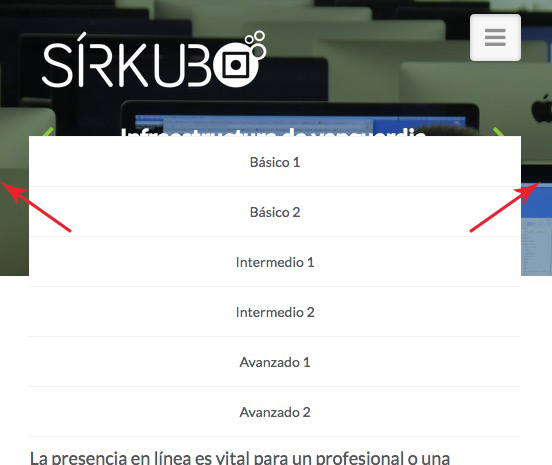
I had to center align the menu text because I don’t know how to fill with white color the space on both sides of the menu, would you please help me with that?

Thank you!!!

Hi there,

Please add this CSS as well,

@media ( max-width: 767px ) {
.x-navbar-inner > .x-container {
width: 100%;
}
.x-btn-navbar {
margin-right: 6%;
}
.x-brand {
margin-left: 6%;
}
}

Cheers!

Awesome!

Thank you!

Glad to hear it!