Change header layout

Please notice that the next section in the layout somehow is overlaying the previous (the colored section with Step 1) in it. I want that colored section to just cleanly end after the text and then the line and the 2 columns to be on white background. Can’t figure out how to do this.

Page: https://heartbehindhustle.com/lead-magnets/your-expert-business-kickstart-checklist/
Pass: STARTmyBIZ

Hello Kamila,

Thanks for writing in!

I checked the page and can see that you are using combination of Classic and V2 sections and element. I believe the problem that you are reporting is related with 🧐 Your Company Name. and the content/background there after. I tried checking on my local setup adding background image to Classic and V2 sections. It’s working fine without any issues.

Issue might be related with unclosed HTML tags. Please cross check the individual elements that you have added and if any custom html is added, please make sure that it’s properly closed.

In case issue is still there, please share the login details in secure note for us to take a closer look.

Thanks.

I figured it out - I had to change the bottom margin to 0px (it was -200px before).

But now I am stuck with a huge space between the end of the text in the colored background section and the next section… how can I close this gap?

If I use the margin and make it negative, it just moves the next section up over the colored background (like you saw previously). Let me know! Thanks!

Hi @Kamila_Gornia,

Did you mean this section?

http://prntscr.com/nchtfl

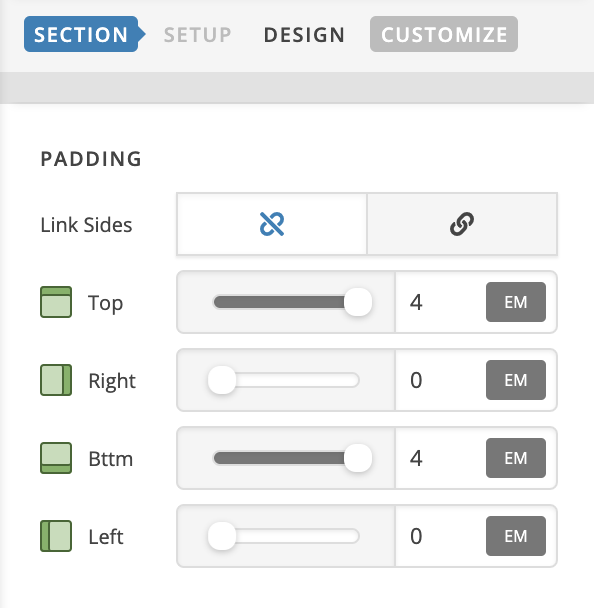
I could see that you added the .page-header class to this section, please remove it and add the top & bottom padding to this section instead:

Let us know how it goes!

This topic was automatically closed 10 days after the last reply. New replies are no longer allowed.