Hi,
On my homepage the first title and text is exactly the size I wanted it to be:
But in order to do this, I changed the rest of my site to these headline sizes.
How can I tweak an element of my choice with CSS without affecting other elements?
Hi,
On my homepage the first title and text is exactly the size I wanted it to be:
But in order to do this, I changed the rest of my site to these headline sizes.
How can I tweak an element of my choice with CSS without affecting other elements?
Hi @idanrub,
Thanks for writing in.
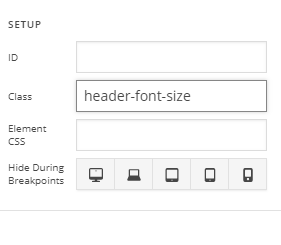
You can add unique class to the header so that you could modify its font size.
For example,
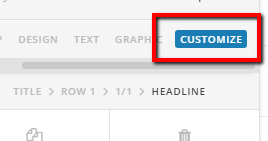
Go to your customize of your element.
Then in the setup, add a class.
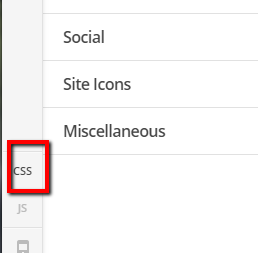
After adding class, add CSS in your X > Theme Options > CSS
CSS:
.header-font-size h1, .header-font-size .h1 {
font-size:10px
}
Hope it helps.
Let us know how it goes.
Thanks.
This topic was automatically closed 10 days after the last reply. New replies are no longer allowed.