Chaneg pricing table headline size

Hi,

Can i ask how you can change the heading size in the a pricing table please? I ideally would like it to shrink depending on its container and i know that you can do something with responsive text but do not know the selector for the header.

thanks,
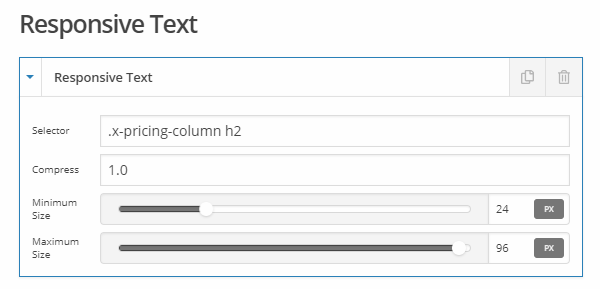
Hey Chris,

The selector you’d need to use for the Responsive Text is .x-pricing-column h2. That is assuming you don’t have h2 in anywhere in the table which is recommended anyway.

Hope that helps.

thanks @christian_y

Just a couple more questions if thats ok? is it possible to change the interval and the pricing around so that the interval text is above the price? Or have a line of text above the price. For example i would like it to be:

From as little as
$19
per month

Also when on mobile view, when each column in the pricing table wraps and drops below each other, there is no spacing between them so it looks a little hard to distinguish between the pricing. Can space be added?

Thanks again.

Hi Chris,

You can add this on your page CSS

h3.x-price:before {
  content: "From as little as";
  display:block;
  font-size:small;
  letter-spacing:0.5px;
}

Please add this to page CSS as well. Feel free to adjust the 4em value.

@media (max-width: 979px) {
	.x-pricing-column {
		margin-bottom: 4em;
	}
}

You can find the proper CSS code selector using the Chrome browser Developer Toolbar
For the CSS code itself, I suggest that you get started with this tutorial

Cheers!

Hi @friech, that all works perfectly! Thank you so much for this, its exactly what i am after!

As always, just a couple more things, can we add a gap just above the h3.x-price.before as its a little close to the header. also do you know how to change the colour of the divider lines between the list items?

If you want to see how i’m doing go to: https://thecircleathlc.co.uk/memberships/

password to access site in secure note. :slight_smile:

Hi there,

Please add this code:

.x-pricing-column-info .x-price {
    padding-top: 15px;
}

.x-pricing-column-info ul>li:first-child {
    border-top: 1px solid #efefef;
}

.x-pricing-column-info ul>li {
    border-bottom: 1px solid #fff;
}

Here are some reference links related to the suggestions above:

Hope this helps.

This topic was automatically closed 10 days after the last reply. New replies are no longer allowed.