Dear Team,
Is there anyway, i can bypass the container for certain sections of a page.
Note: Container set on Page Template
Dear Team,
Is there anyway, i can bypass the container for certain sections of a page.
Note: Container set on Page Template
Hello Mohamed,
My apologies but I am not certain what you mean by bypassing the container.
Is it possible for you to send us a photo or a link to a sample display that depicts what you are trying to do so that we can provide some suggestions?
Thank you.
Hello Jade,
Below is an image representation, the one marked with red is the site within a container.
The one marked in blue has to bypass the container to fit full width of the page.
Hi Arshad,
Thank you for the screenshot. To make the section fullwidth, go to the Row settings of the section in Cornerstone and turn off the Global Container (see screenshots)
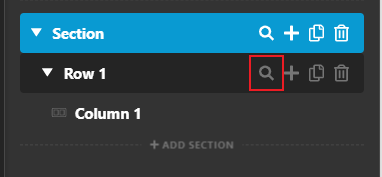
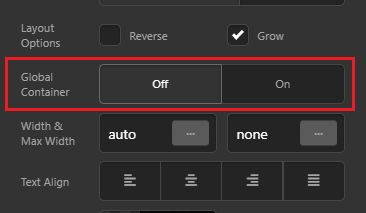
Let us know how this goes!
Hello Nabeel,
It does not work.
Also, is it possible to turn off the container for mobile version of the site? as it doesnt look nice on mobile?
Hi @blueuae,
Thanks for writing in. Currently Pro/X doesn’t have a way to bypass that but you can use a custom css to achieve it, here is a link that should help you with it. https://css-tricks.com/full-width-containers-limited-width-parents/#article-header-id-3. Try adding the CSS to the section’s element CSS.
Hope it helps.
Thanks!
This topic was automatically closed 10 days after the last reply. New replies are no longer allowed.
