Hi there,
How do I centre the “line” element?
I have this and need it centred:

Thank you 
Hi there,
How do I centre the “line” element?
I have this and need it centred:
Thank you
Hello @artthescience,
Thanks for posting in!
I am assuming that you are using NonProfit demo as your template in creating that page. To align the line to the center, please add the following CSS code in the X > Theme Options > Global CSS (http://prntscr.com/evui3r)
.h-custom-headline.cs-ta-center hr {
    margin-left: auto;
    margin-right: auto;
}
Please let us know if this works out for you.
Hi there,
Thank you for your reply.
I do not know what the NonProfit demo is. How do I tell if I am using it?
I tried adding the ccs and it did not work 
Thank you
Hey @artthescience,
Sorry for the confusion. I have checked your page and I found out that you are using the line element inside a one column row. To center the line element, please enabled the individual margins in the line element settings and set the left/right margin to auto.
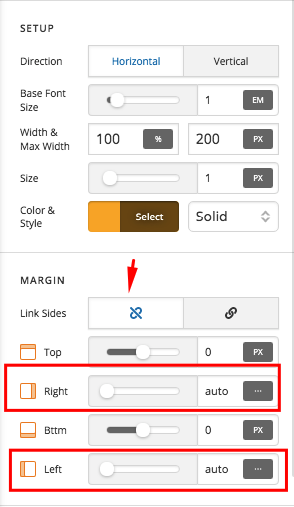
If you need anything else we can help you with, please let us know.
That worked perfectly! Thank you SO MUCH!!! 
You are most welcome!
This topic was automatically closed 10 days after the last reply. New replies are no longer allowed.