Hello,
It seems like much of xpro is graphical… heck you can change borders, add shadows… but I can’t find a way to center an image without using CSS… There must be a way to do this?
Thanks!
Hello,
It seems like much of xpro is graphical… heck you can change borders, add shadows… but I can’t find a way to center an image without using CSS… There must be a way to do this?
Thanks!
Hi There,
Thank you for writing in, please inspect the column where the image is placed and set the text align option of it to center.

If you have text or headline element on that column that you don’t want to center, inspect those text or headline element and set their respective text alignment separately.
Hope it helps,
Cheers!
But this would mean that everything in that column will get centered and not just the image - yes? so i need to have a column just with one image… why is it not possible to just have a button that adds the css to center an image?
Hi There @fxground
Yes, it will affect to the whole column.
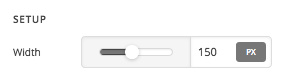
In that case, you can set a image width.
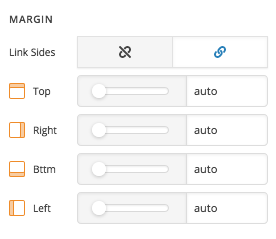
Then margins to auto.
Finally, assign a class to the image

Then add the following CSS rules.
.center-img{
  display:block;
}
Hope that helps.
This topic was automatically closed 10 days after the last reply. New replies are no longer allowed.